
Time Tracker Plus
TimeTimers, timesheets, approvals, billing, profit and live dashboards, built into Redmine on its own time entries, users, roles and permissions.
Multiple servers: $399
- Redmine
- 4.2 – 7.0
- Databases
- MySQL, MariaDB, PostgreSQL, SQLite
- Approval levels
- 1 to 5
- Exports
- CSV, XLSX, PDF
- Extra infrastructure
- None
- Core files changed
- None
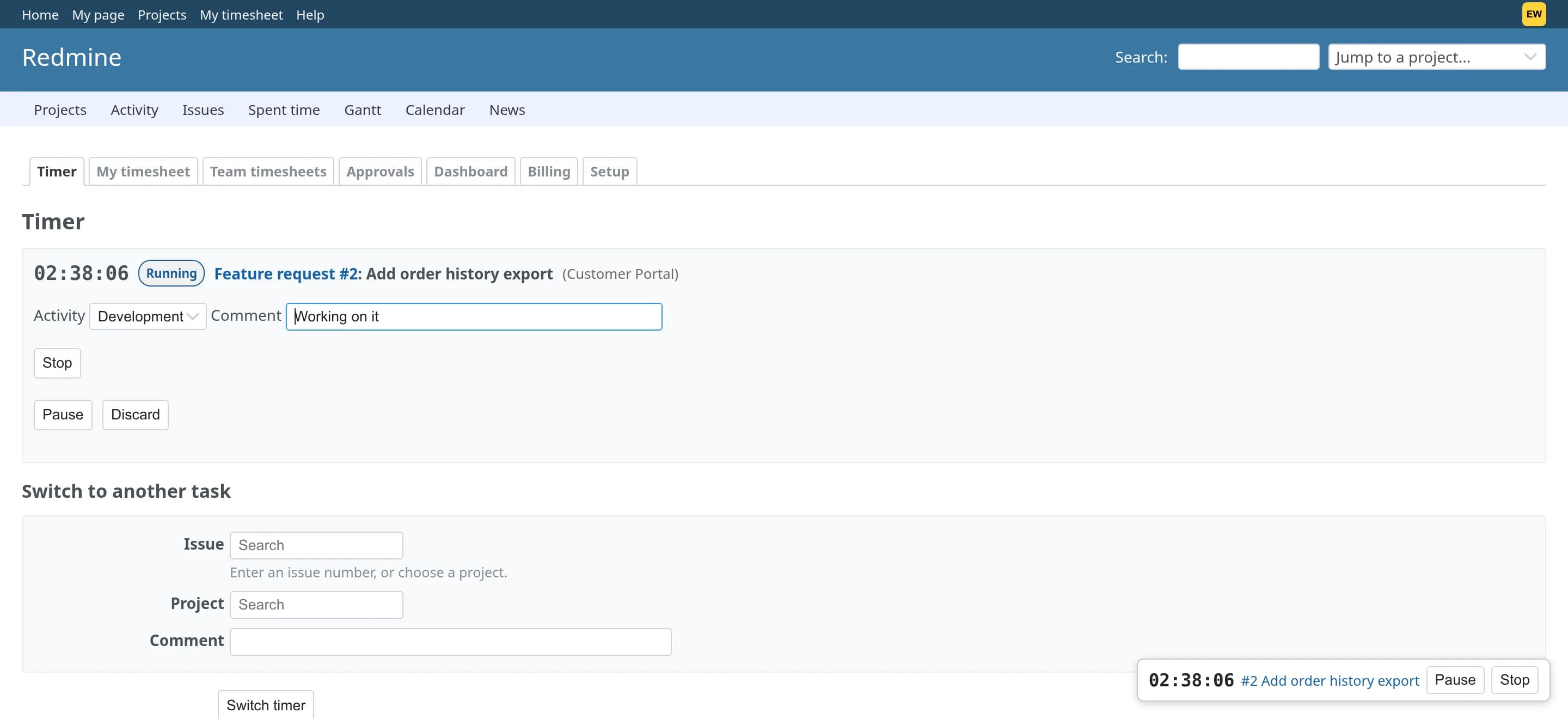
Server-side timers
Start, pause, switch and stop from the issue, the project or a floating widget on every page. Time is measured by the server, so it survives reloads, closed laptops and restarts.
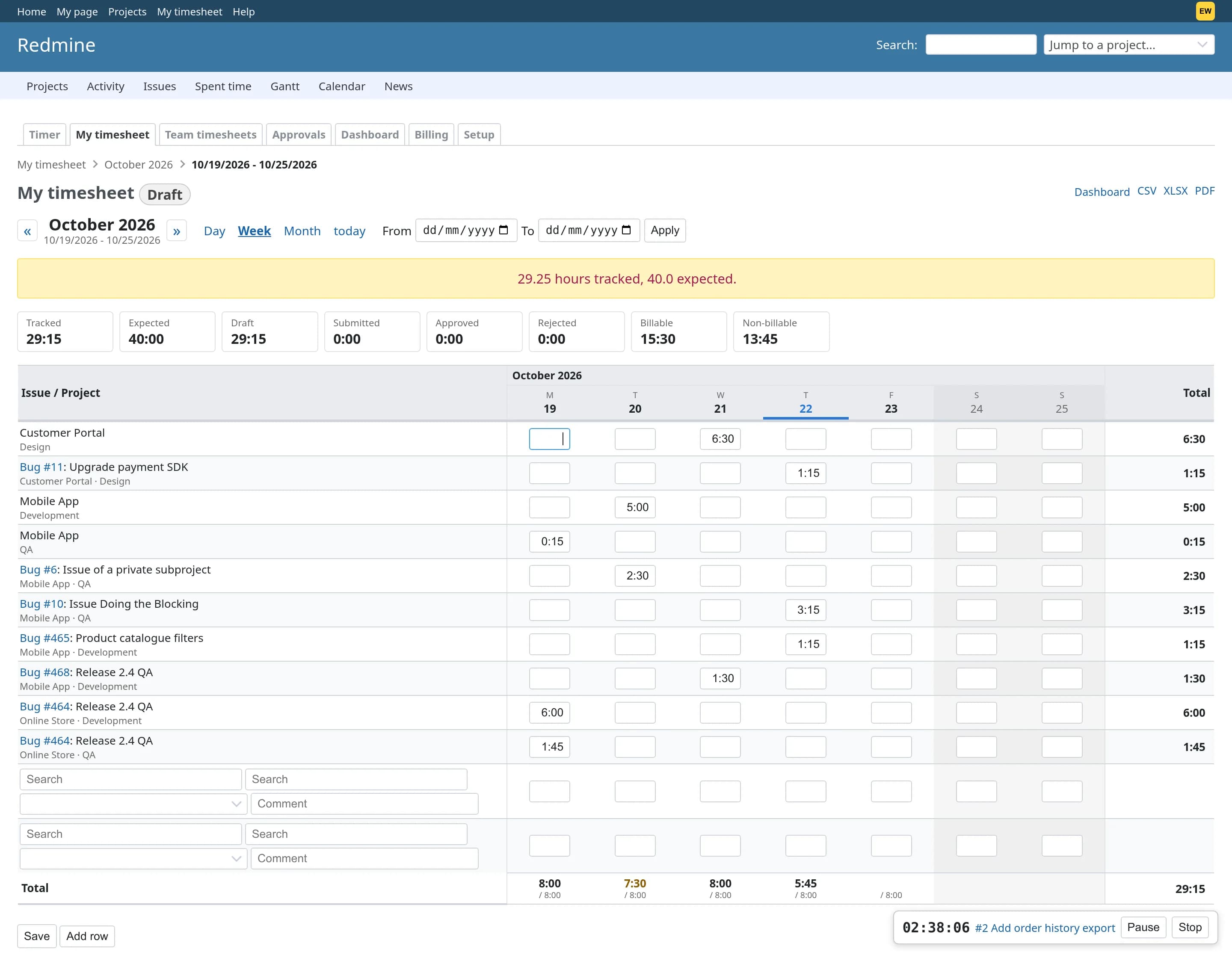
Weekly timesheets
Day, week, month and custom views. Type hours straight into the grid, copy last week, and see tracked time against each person's working calendar.
Approval workflows
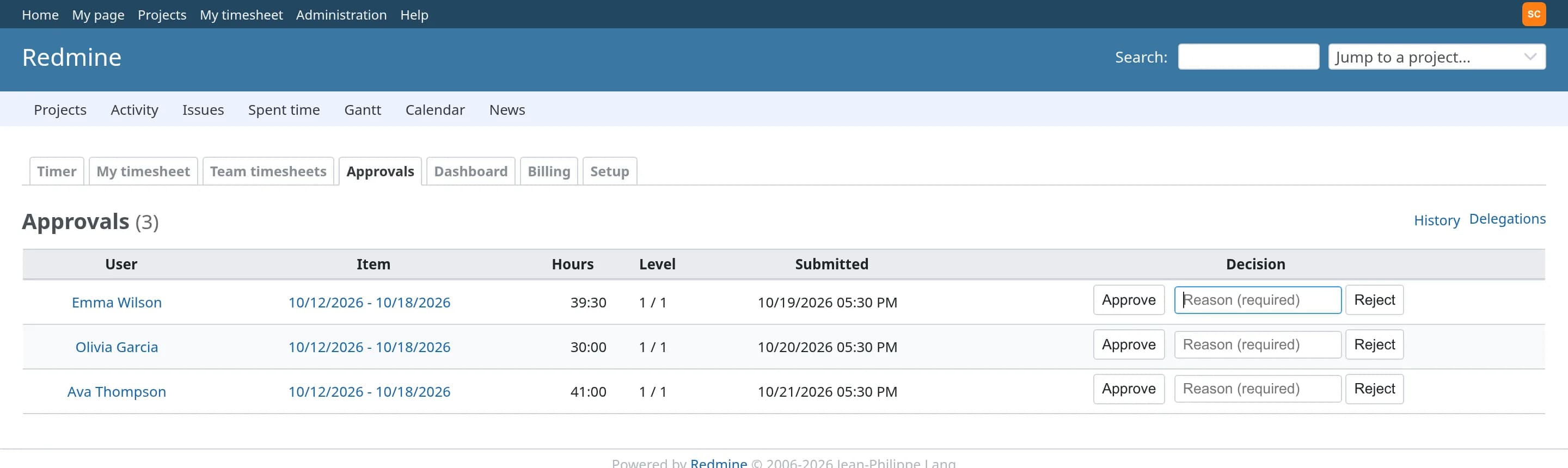
Draft, submitted, approved, locked. One to five levels routed by project, team or role, with delegation, reminders and escalation.
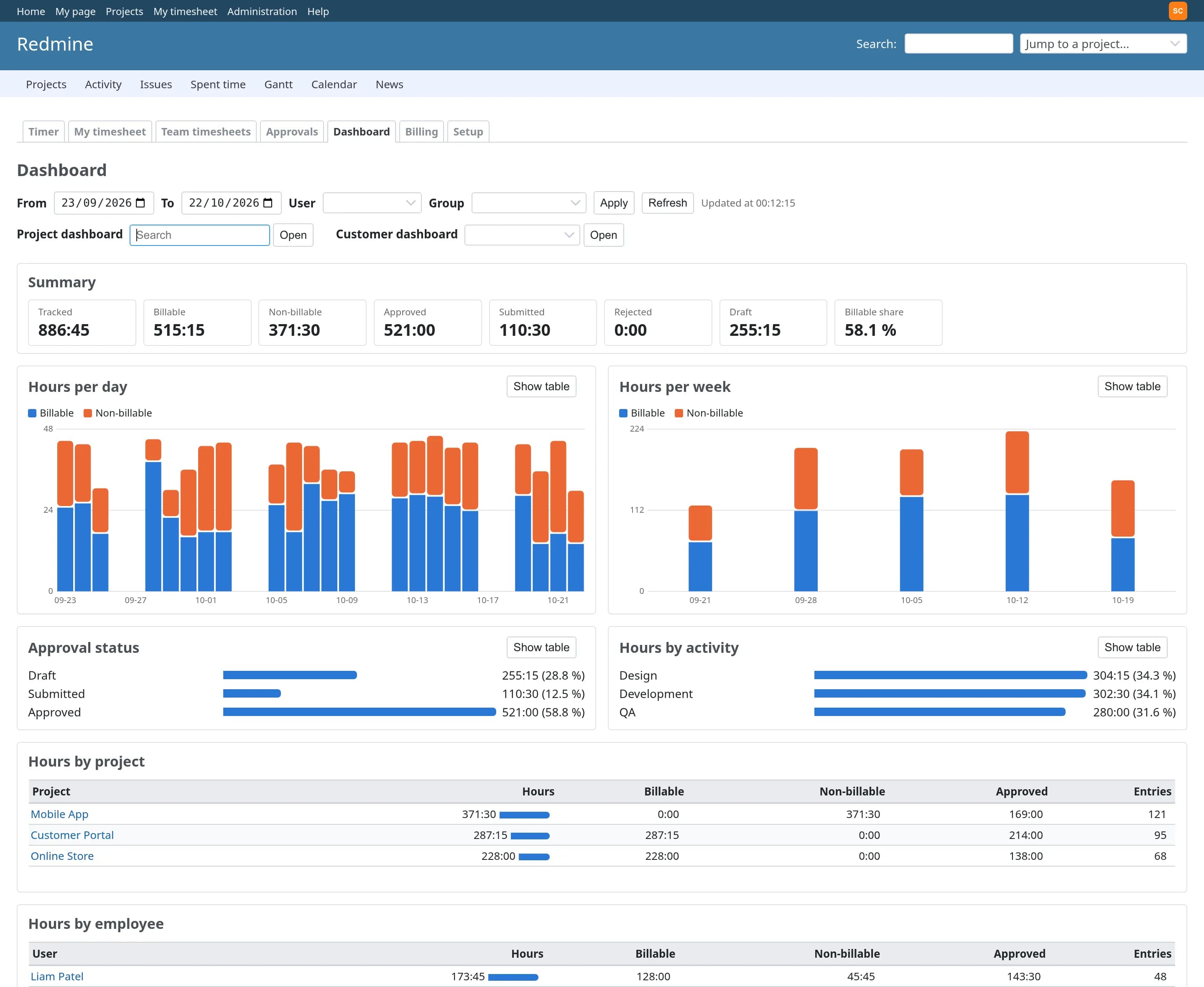
Live dashboards
For the team, each project, each customer and each person: hours, billable split, utilization, estimate versus actual and budget used.
Billing to the cent
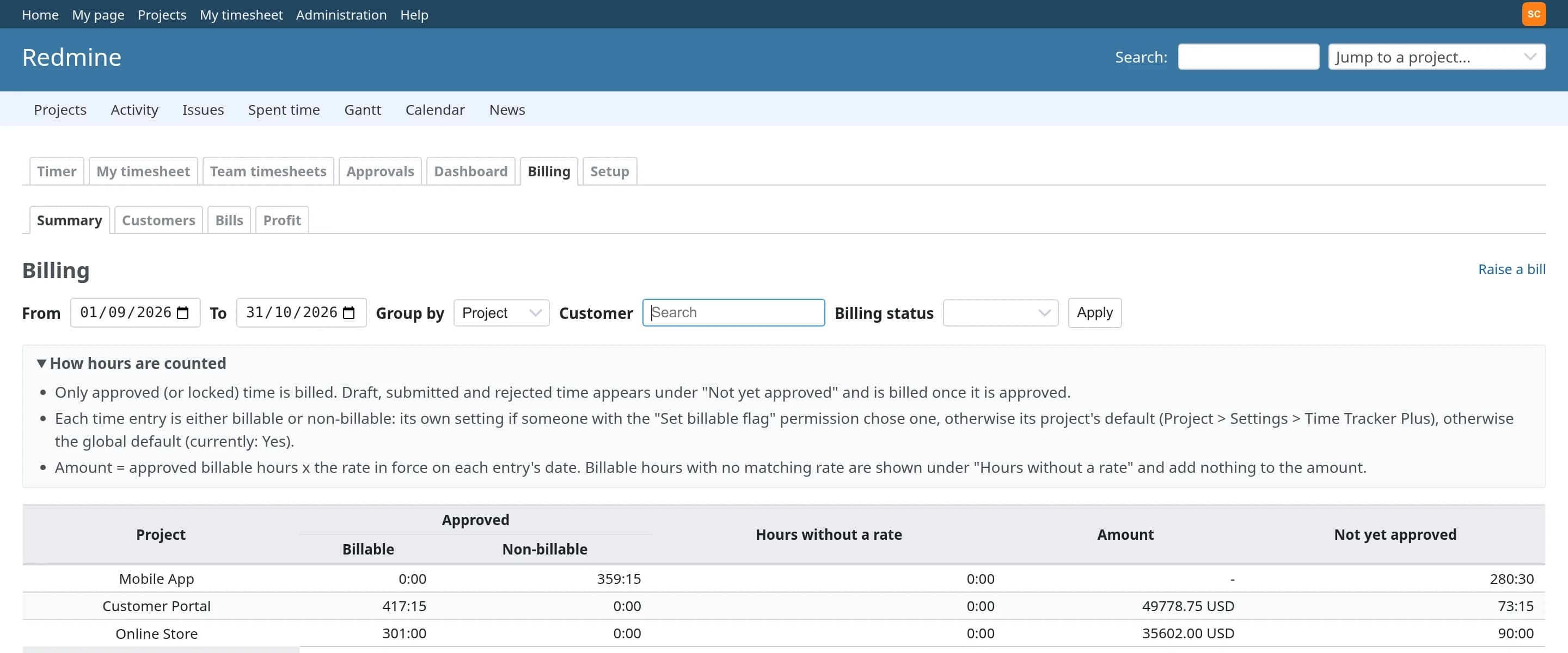
Rates by person, role, activity, project, customer or contract. Bills cover approved hours only and can never include an entry twice.
Profit per project
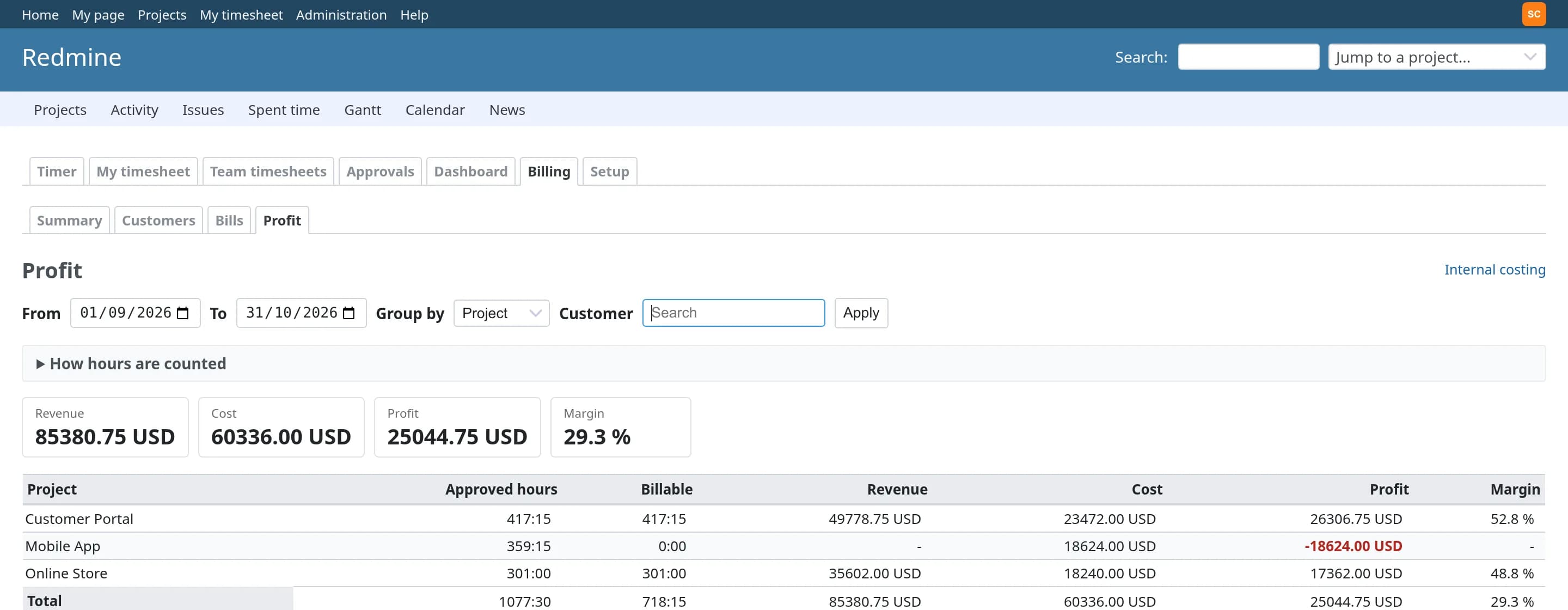
Record what an hour of work costs and set it against revenue per project, person, customer or activity, with the margin.
Built on Redmine's own time log
Every hour is a native Redmine time entry, so the spent time report, issue totals and REST API you already use keep working, and nothing has to be synchronised.
Native time entries
Works with Redmine's own time log, reports and REST API. Uninstall the plugin and the hours are still there.
No core changes
No Redmine file is modified. The plugin's patches are additive and load through the standard plugin API.
No extra infrastructure
No Redis, no Sidekiq and no extra gems to run. If Redmine runs, Time Tracker Plus runs.
Permission aware
Every page, export and API call shows only what a role may see, using the roles and memberships you already manage.
Server-side timers that never lose a minute
Start, pause, resume, stop and switch from the issue page, the project overview or the floating widget on every page. Time is measured by the server, so it survives page reloads, closed laptops and restarts.
| Behaviour | What it does |
|---|---|
| Exactly once | A stopped timer becomes one native Redmine time entry, even with double clicks or retries. |
| Guard rails | Idle warnings, a maximum duration and rounding rules, set by the administrator. |
| Midnight | Choose whether a timer that crosses midnight counts on the start day, the stop day or both. |
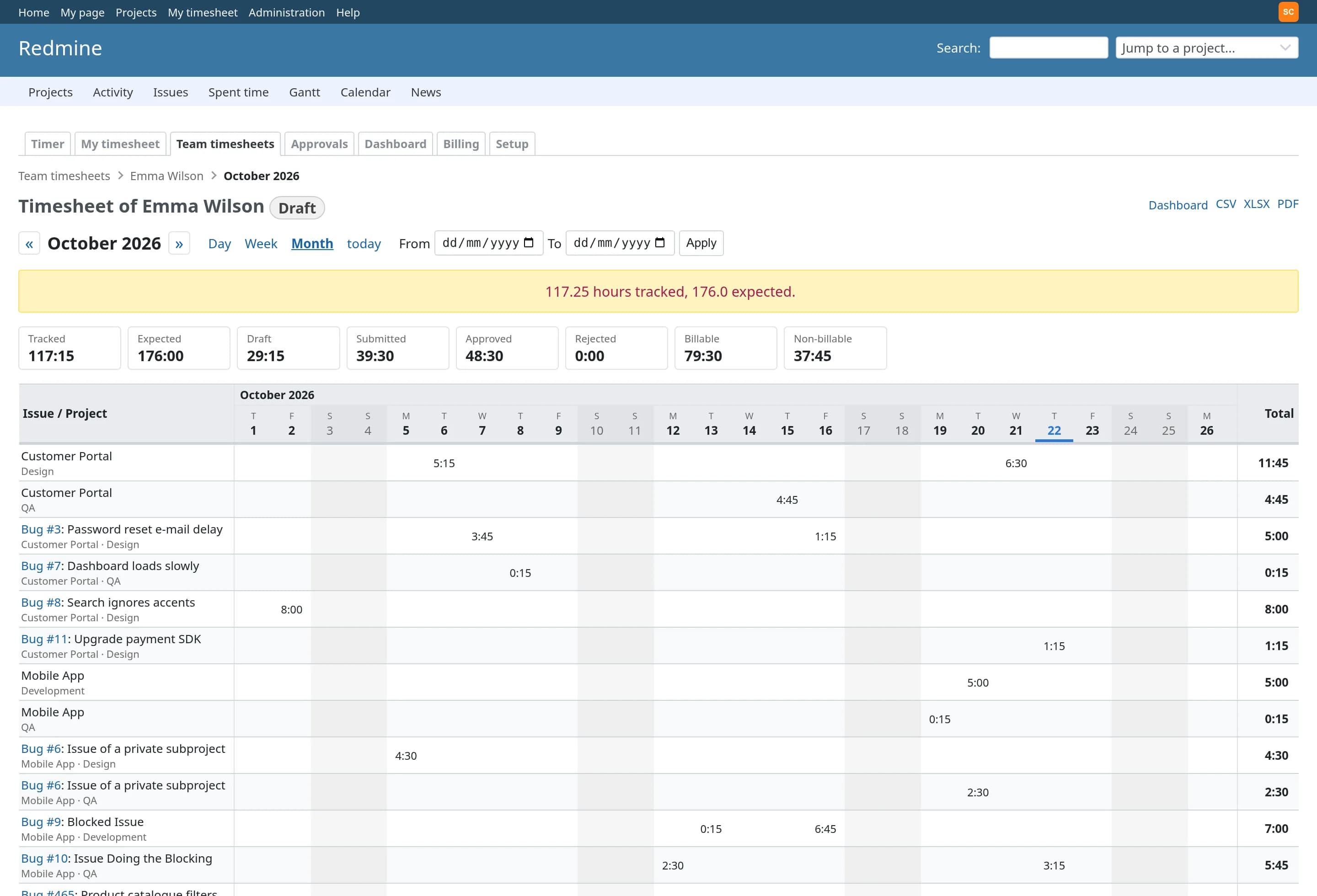
A weekly grid people actually like filling in
Day, week, month and custom views. Type hours straight into the grid, copy last week, and see tracked time against each person's working calendar, including holidays and part-time schedules.
Totals by status
Draft, submitted, approved, rejected, billable and non-billable, for every row and every day.
Calendars that know the person
Weekends and holidays are shaded and short days are flagged, against each person's own expected hours.
Exports that match the screen
CSV, XLSX and PDF, with exactly the figures the grid shows.
Approval workflows that fit how you work
Draft, submitted, approved, locked, with reject (reason required), recall and audited reopening. One to five approval levels, routed by project, team or role, with delegation, reminders and escalation.
| State | Who acts | What can change |
|---|---|---|
| Draft | The person logging time | Everything, until it is submitted |
| Submitted | The approver at each level | Nothing; the person can recall it, the approver can approve or reject with a reason |
| Approved | Billing, reports | Nothing, anywhere, including Redmine's own time log |
| Locked | Administrators | Nothing, until the period is reopened, and the reopening is audited |
Close the books on a period, or a project
Approve per timesheet or per entry. Lock whole periods once they are reported, and close a project to new time after a given date or once its budget hours are used up. The limit applies on every page and every API call, not just the timesheet.
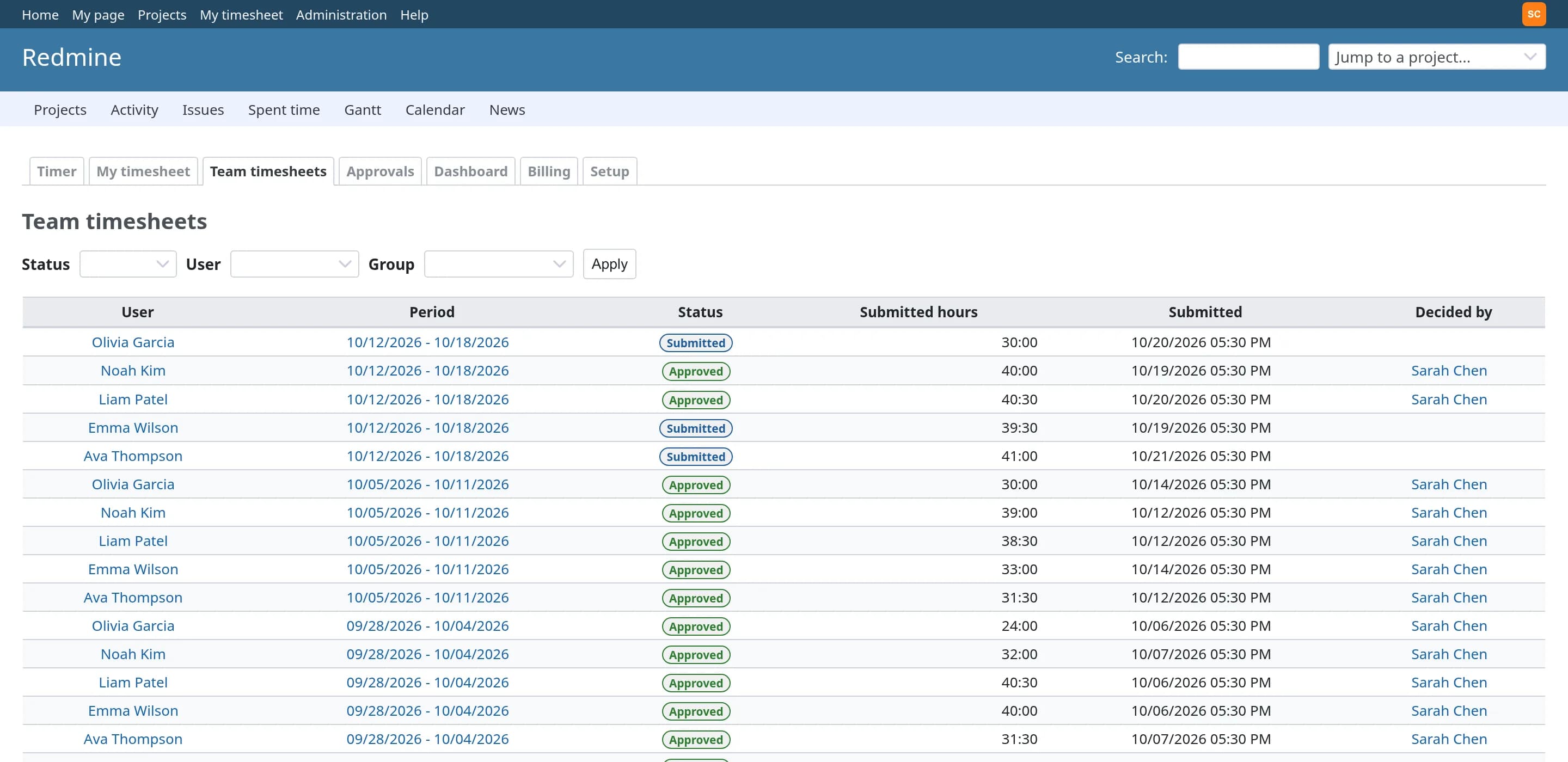
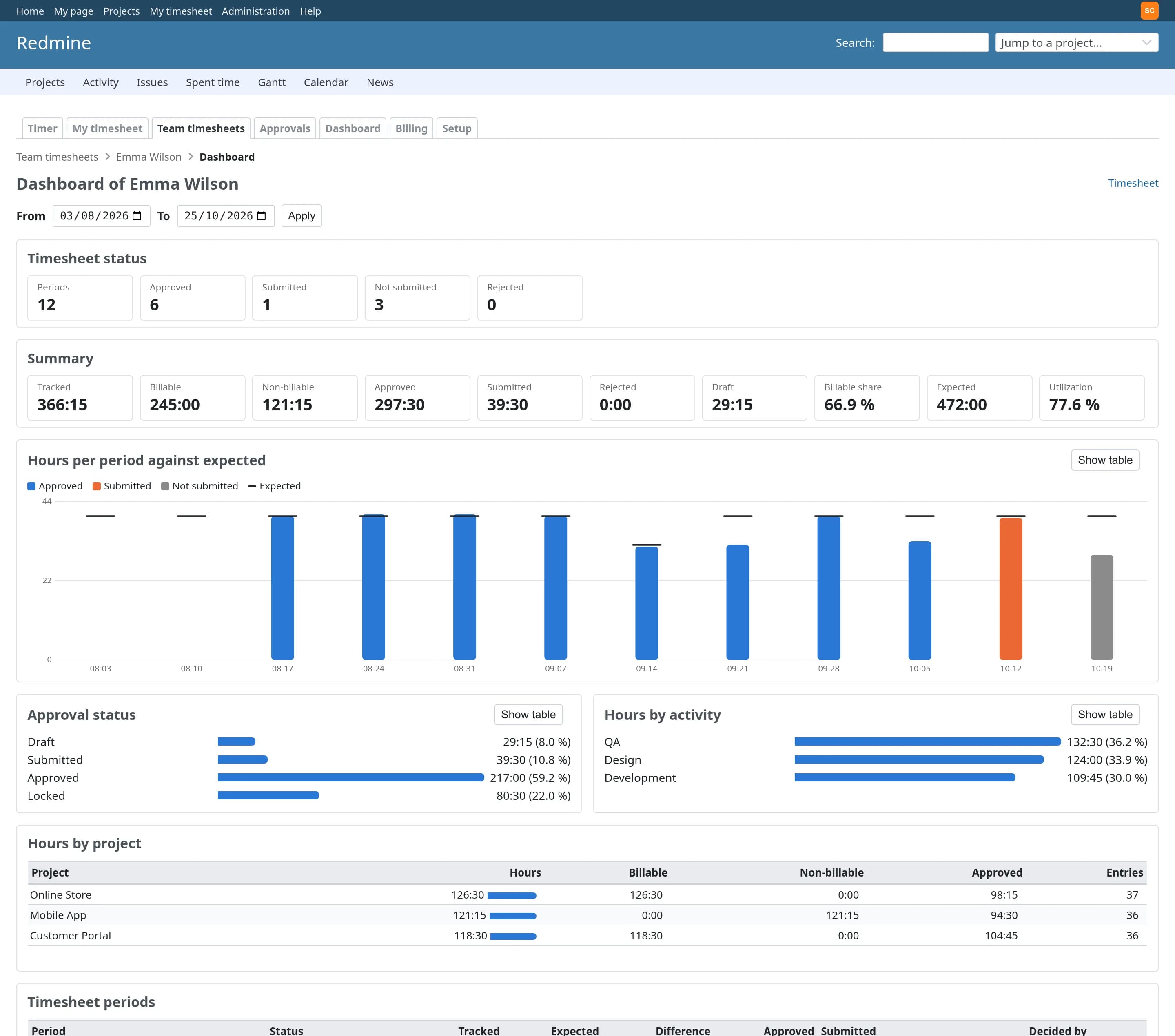
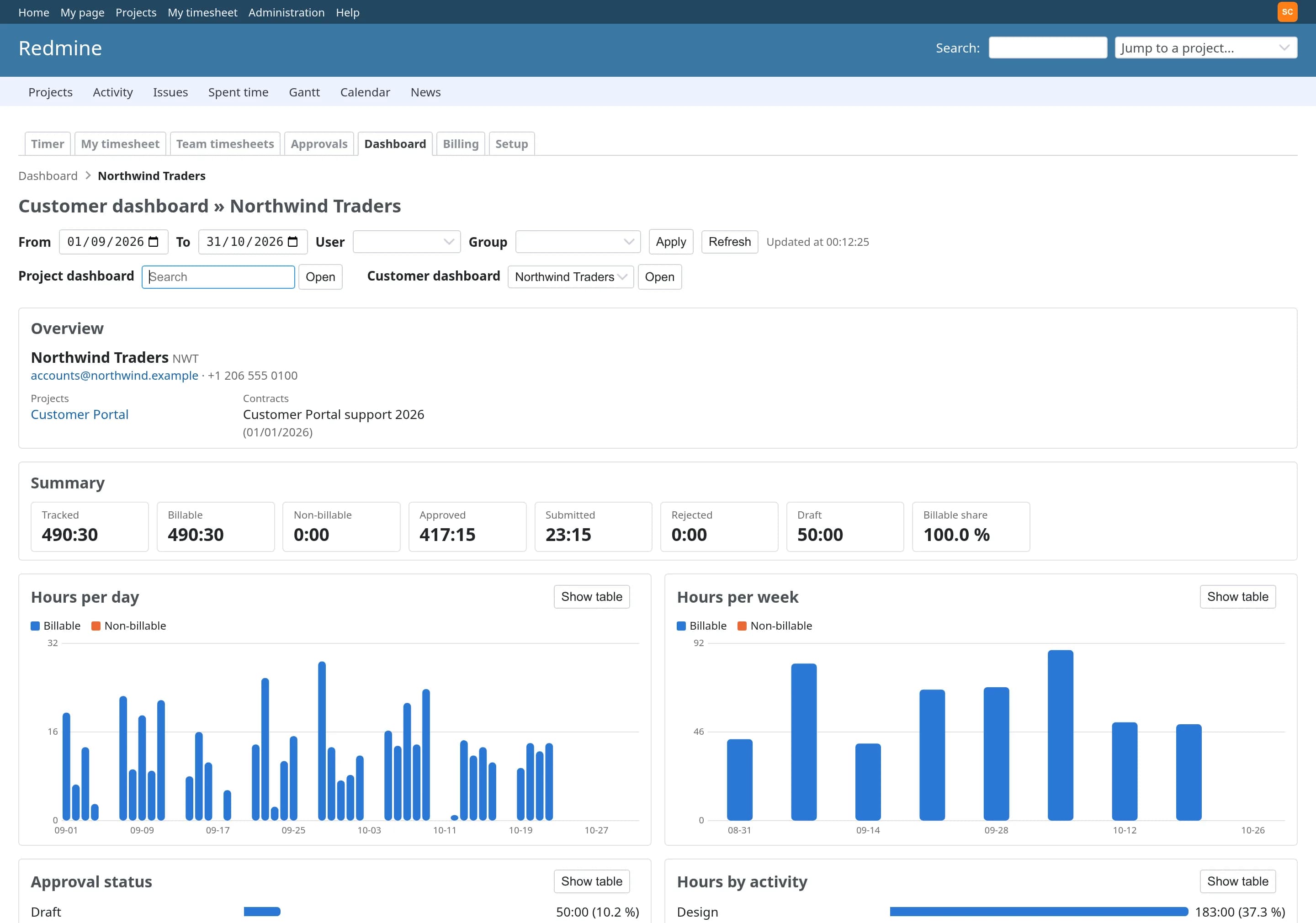
Live dashboards for the team, each project, each customer and each person
Hours per day and week, billable split, approval status, activities, utilization, estimate versus actual and budget consumption. Click any project, customer or person to open their own dashboard.
Person
Hours per period against expected hours, and the status of every timesheet.
Project
The customer, the contract and how much of the budget has been used.
Always current
Refreshes automatically, and only shows what the viewer may see.
Exact amounts over approved hours only
Set what is billable per entry, per project or globally. Rates by person, role, activity, project, customer or contract, with validity dates and currencies. Amounts are computed per entry, to the cent.
Bills freeze what they contain
The hours and amounts on a bill are fixed when it is created, and no entry can appear on two bills.
Hand off to accounting
Void a bill or mark it invoiced; your accounting system does the rest.
Per-customer pipeline
What is not yet approved, ready to bill, on a bill and invoiced, for each customer.
See what every project really earns
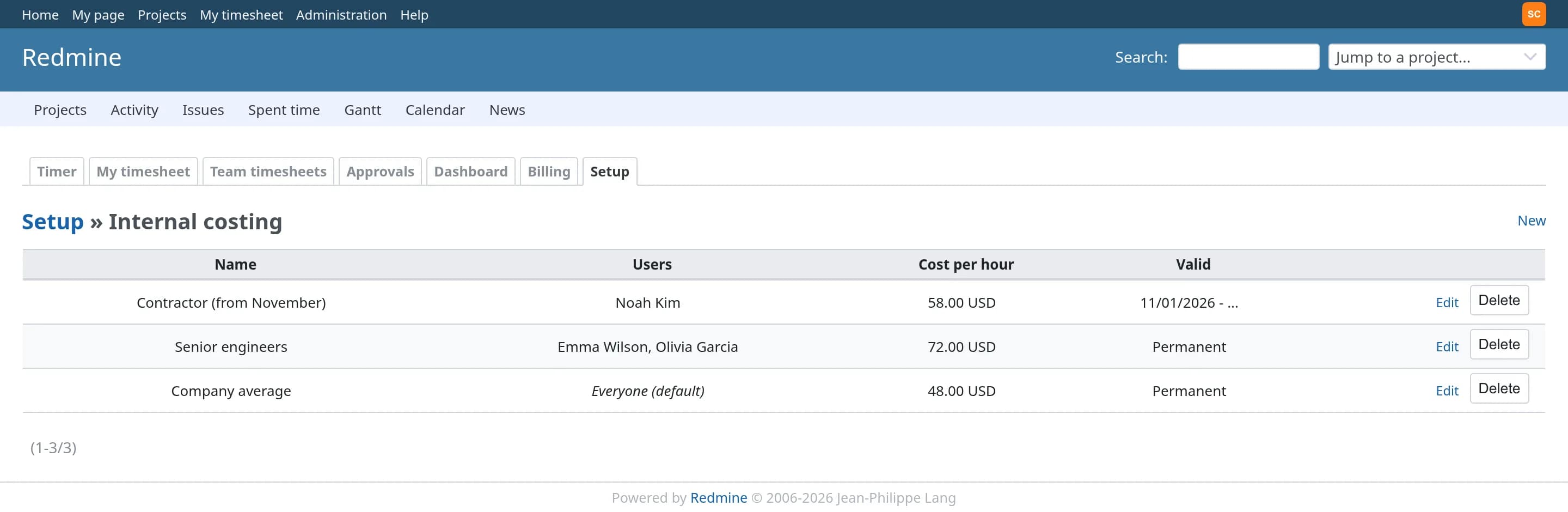
Record what an hour of work costs, for everyone or for chosen people, permanently or from a date. The profit report sets revenue against internal cost per project, person, customer or activity, with the margin.
Costs stay private
Internal costs are only visible to the people you allow.
History is kept
When a cost changes, earlier months keep their old cost, so past margins do not move.
Internal work counts too
Internal, non-billable projects show what they cost the business.
Everything else you would expect
Built the Redmine way, on the users, roles and projects you already manage.
Roles and permissions
Fine-grained project and organisation-wide permissions, granted to Redmine roles. No separate user management.
Full audit trail
Corrections, approvals, rate changes, reopened periods, bills and settings are recorded with who, when, IP and before and after.
Versioned REST API
Timers, entries, timesheets, approvals, rates, bills and dashboard metrics under /ttp/api/v1, with Redmine's API keys.
Calendars and holidays
Working calendars per person or group, part-time schedules and holidays, so expected hours are right for everyone.
Exports
CSV, XLSX and PDF for timesheets and bills, with the exact figures shown on screen.
Project limits
Stop logging beyond a project's budget hours, or after a given date, on every page and API.
Install in three steps
Requires shell access and the ability to run rake tasks. Always back up before installing a plugin.
cd /path/to/redmine
# the package arrives by email, or from your download link
unzip time-tracker-plus-*.zip -d plugins/
bundle exec rake redmine:plugins:migrate \
  NAME=time_tracker_plus RAILS_ENV=production
touch tmp/restart.txt   # or systemctl restart redmine
# then enable the module in your projects
# and grant its permissions to your roles
# fill your projects with realistic demonstration data
bundle exec rake ttp:demo:seed RAILS_ENV=production

# and take it all out again
bundle exec rake ttp:demo:remove RAILS_ENV=production
Does it replace Redmine's time log?
What happens to a timer if I close my laptop?
Can approved time still be edited in Redmine's own time log?
Does it create invoices?
Who can see internal costs and profit?
Do we need Redis, Sidekiq or anything else running?
Which Redmine versions are supported?
Pricing
Single server
One Redmine instance · unlimited users · 12 months of updates.
Multiple servers
Unlimited Redmine servers · unlimited users · 12 months of updates.