
Redmine Reminders
NotificationsManual, scheduled and rule-driven reminders for the issues that are quietly drifting — sent from the issue page, a saved query or the administration console, through the mailer you already use.
Multiple servers: $399
- Reminder types
- 3
- Receiver modes
- 4
- Schedules
- Daily · weekly · monthly
- Permissions
- 4, per project
- Data leaves host
- Never
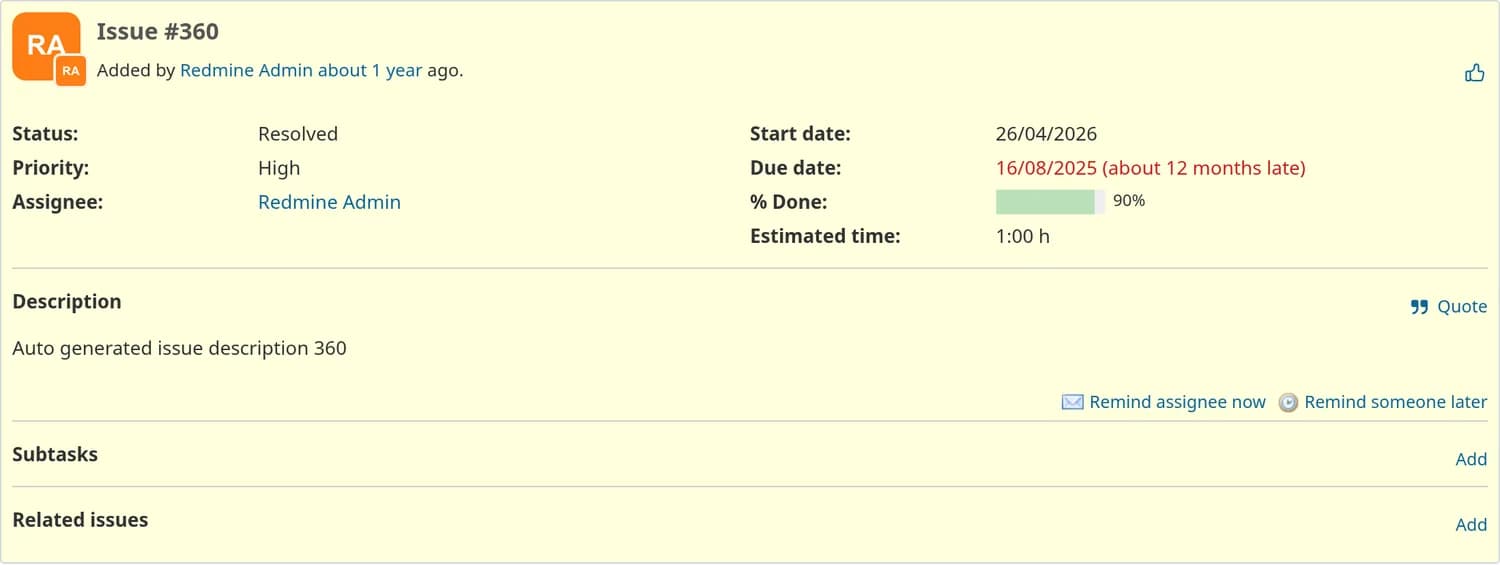
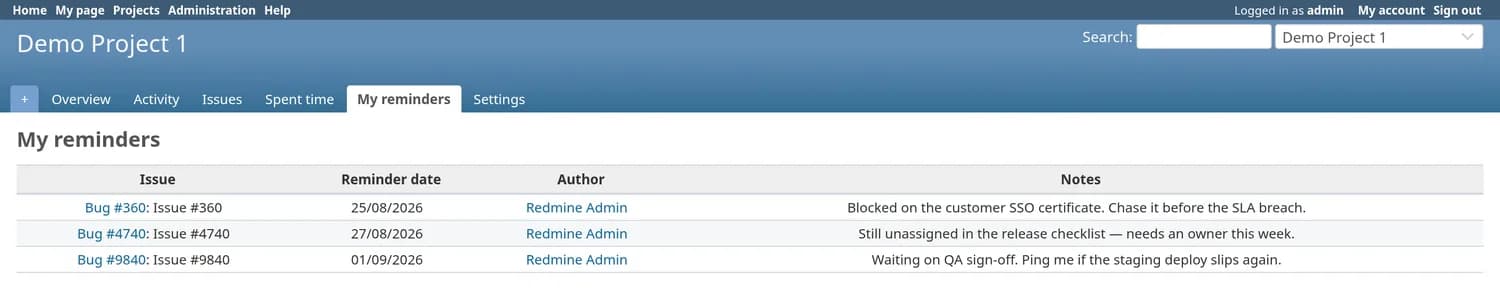
Remind the assignee now
A button on the issue page. It resolves the assignee — falling back to the author, then to an administrator — and the mail is on its way before the page reloads.
Remind someone later
Pick a receiver, a date and a note, and it waits. If the issue closes before that date arrives, the reminder is marked skipped rather than sent.
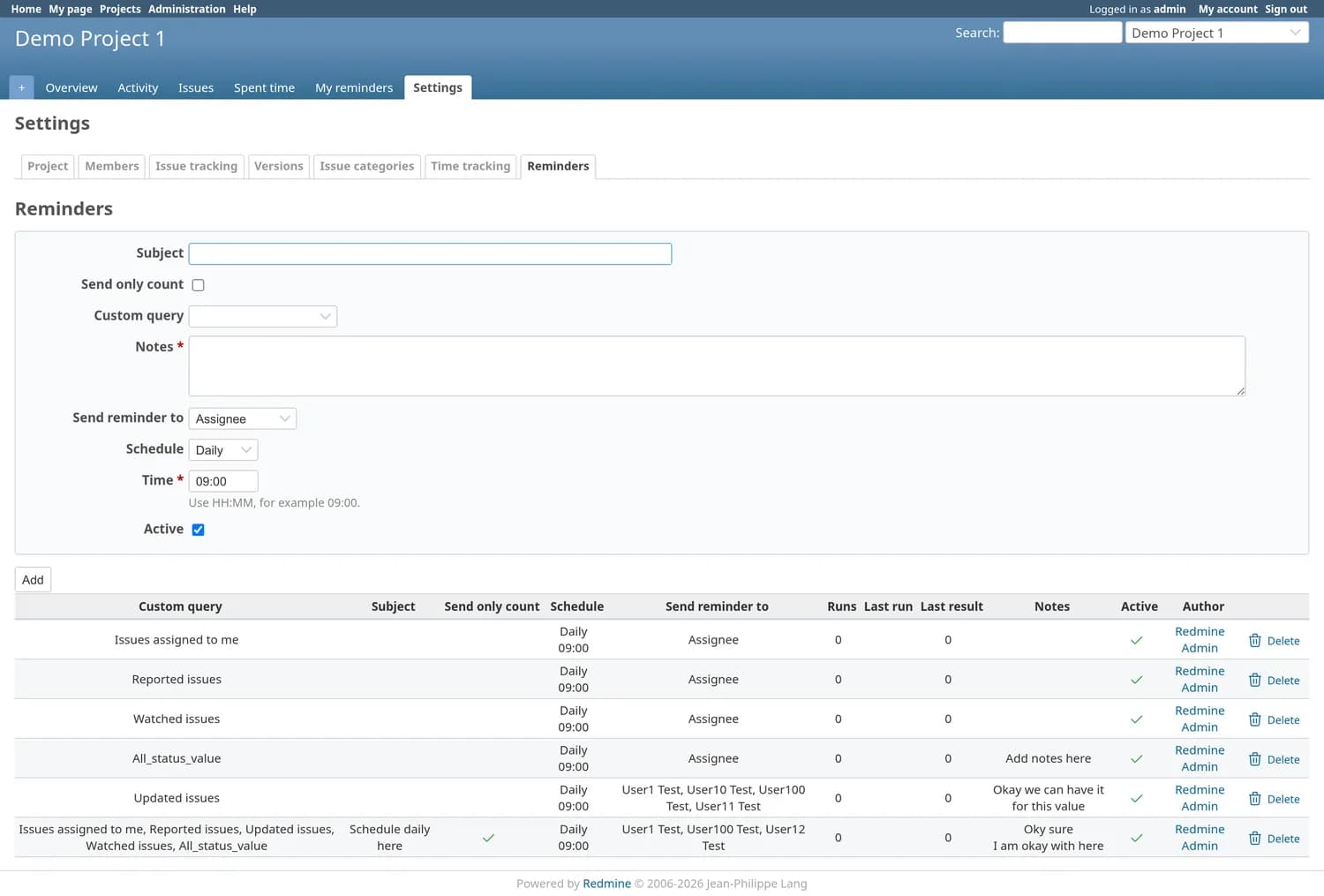
Rules on a saved query
Attach a rule to any issue query: daily, weekly on chosen weekdays, or monthly on chosen dates, at a set time. Open issues in the result get reminded, at most once a day.
Send only the count
Point one rule at several queries and mail the numbers instead of the issues — a standing pulse check for leads who want the shape, not the list.
Nobody gets nagged twice
Closed issues, disabled modules and locked accounts are filtered at delivery time, and receivers are deduplicated before a single mail goes out.
Four permissions, per project
View, manage, send and view statistics — granted by role, on top of a project module you can switch off entirely. Every send and skip lands in the activity log.
One click, one date, or one rule
Every reminder is stored, delivered and logged the same way. What differs is who decides when it goes out — you, right now; you, for a date in the future; or a rule that watches a saved query on your behalf.
Manual — remind the assignee now
A button on the issue page. It resolves the assignee, falls back to the author and then to an administrator if nobody is assigned, and the mail is on its way before the page reloads.
Scheduled — remind someone later
Pick a receiver, a date and a note, and it waits. If the issue is closed before that date arrives, the reminder is quietly marked skipped instead of sent — the note was about work that no longer needs doing.
Automatic — a rule on a saved query
Attach a rule to any issue query: daily, weekly on chosen weekdays, or monthly on chosen dates, at a set time. Open issues in the result get reminded, and a rule fires at most once a day.
The query you already keep is the rule
There is no second filter language. A rule points at one of your saved issue queries — overdue, unassigned for three days, stale support tickets — so the definition of “drifting” stays where your team already maintains it. Change the query and every rule built on it follows.
It lives in three places you already use
The plugin adds to the issue page, the project and the administration console — and nowhere else. Every screen here is Redmine 6 running Redmine Reminders 1.0.0.
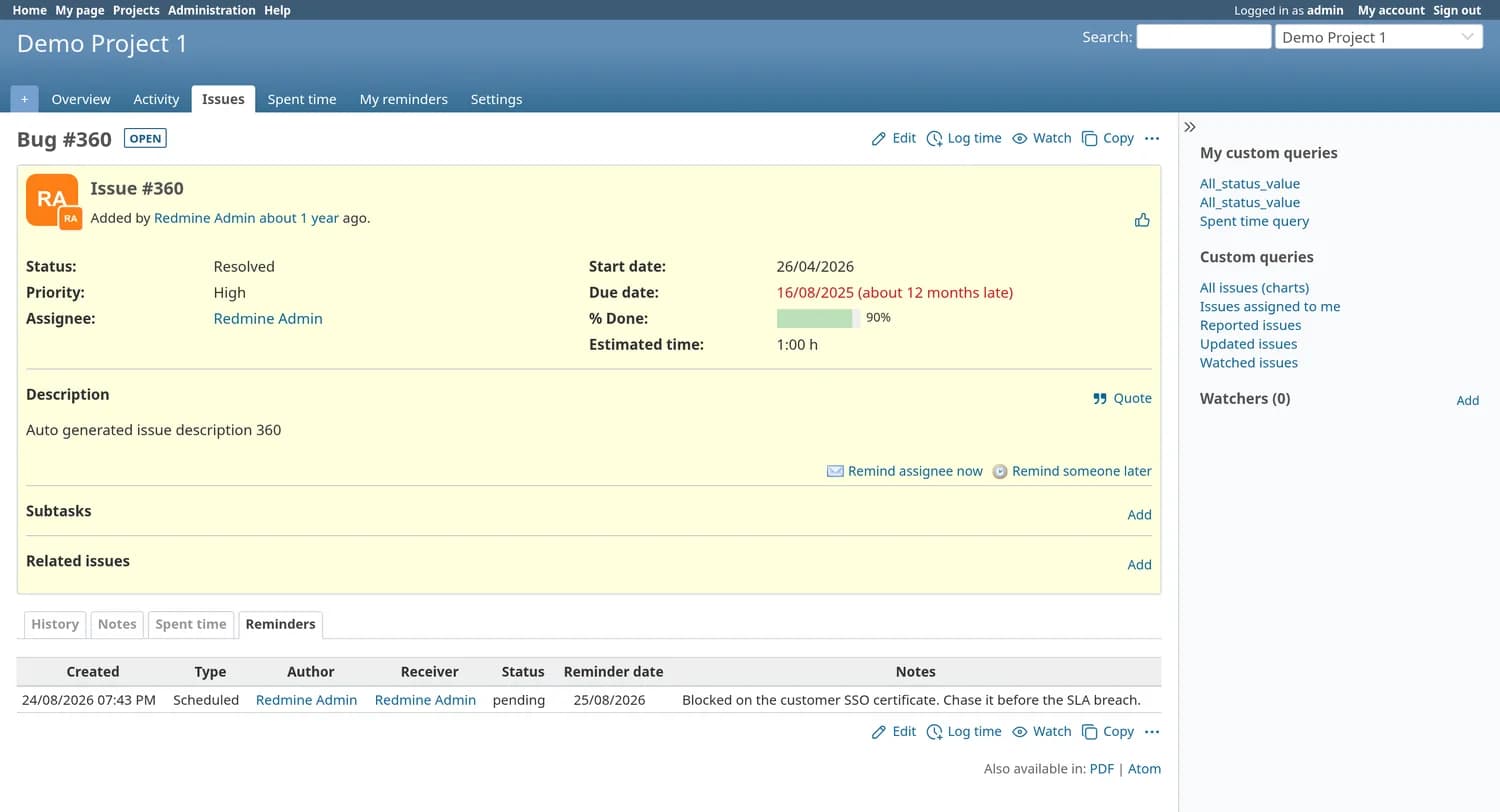
On the issue
view_issues_show_description_bottom · history tab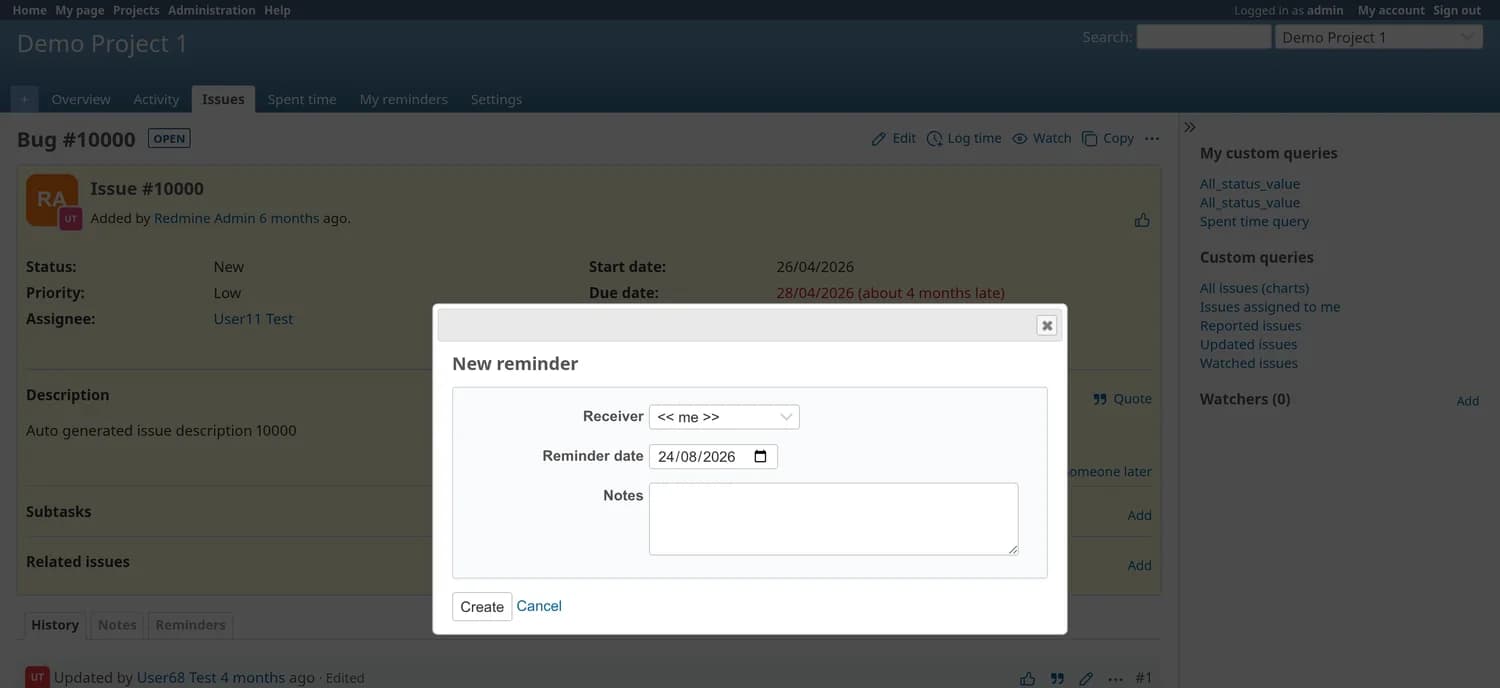
In the project
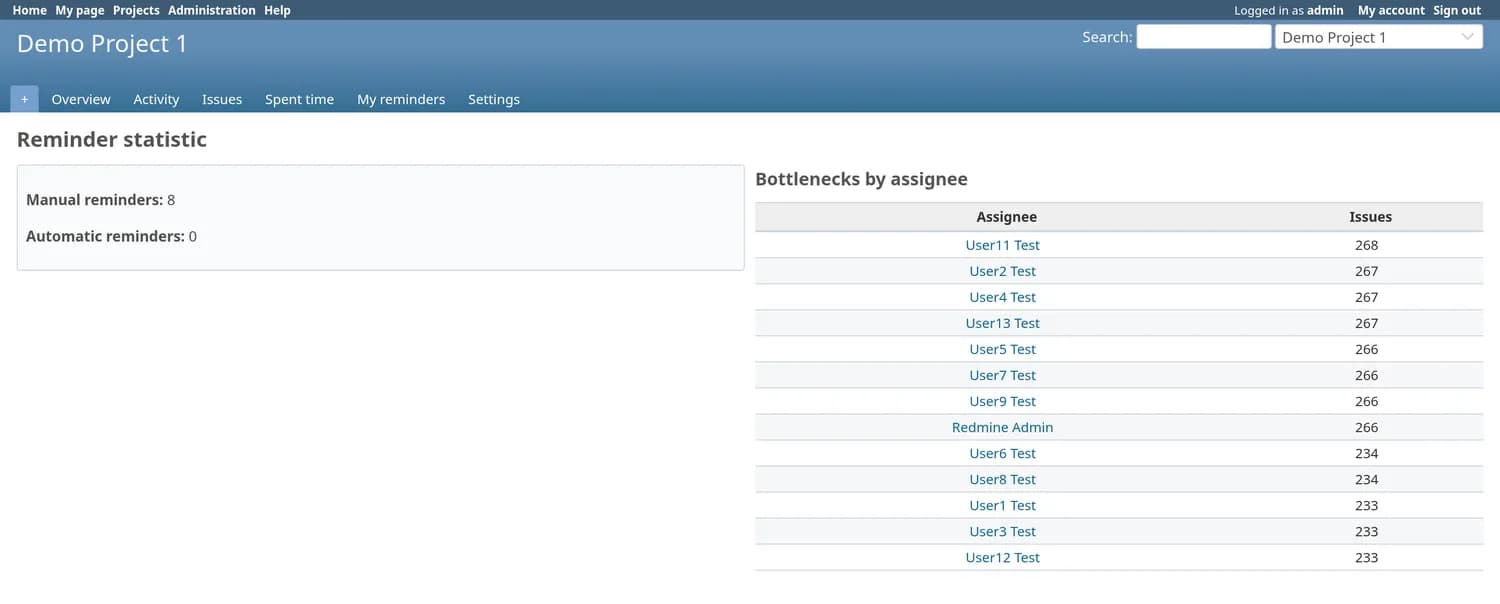
Settings › Reminders · project menu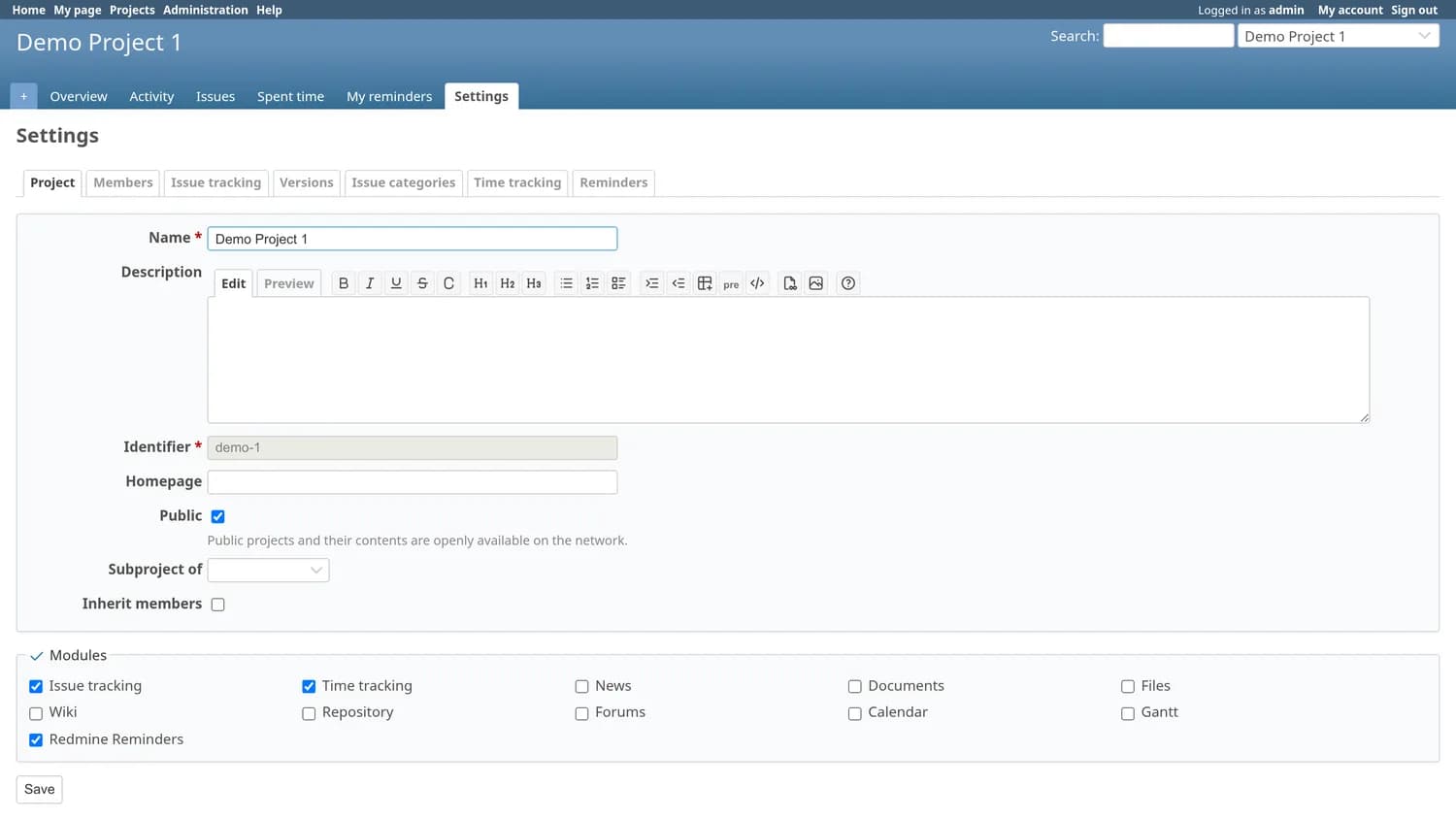
In the admin console
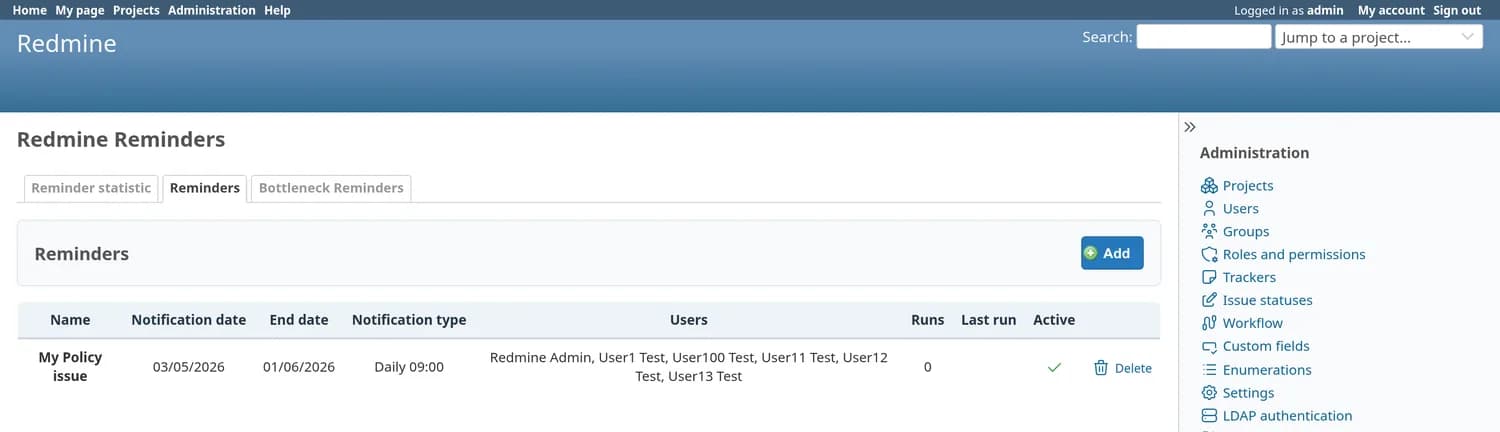
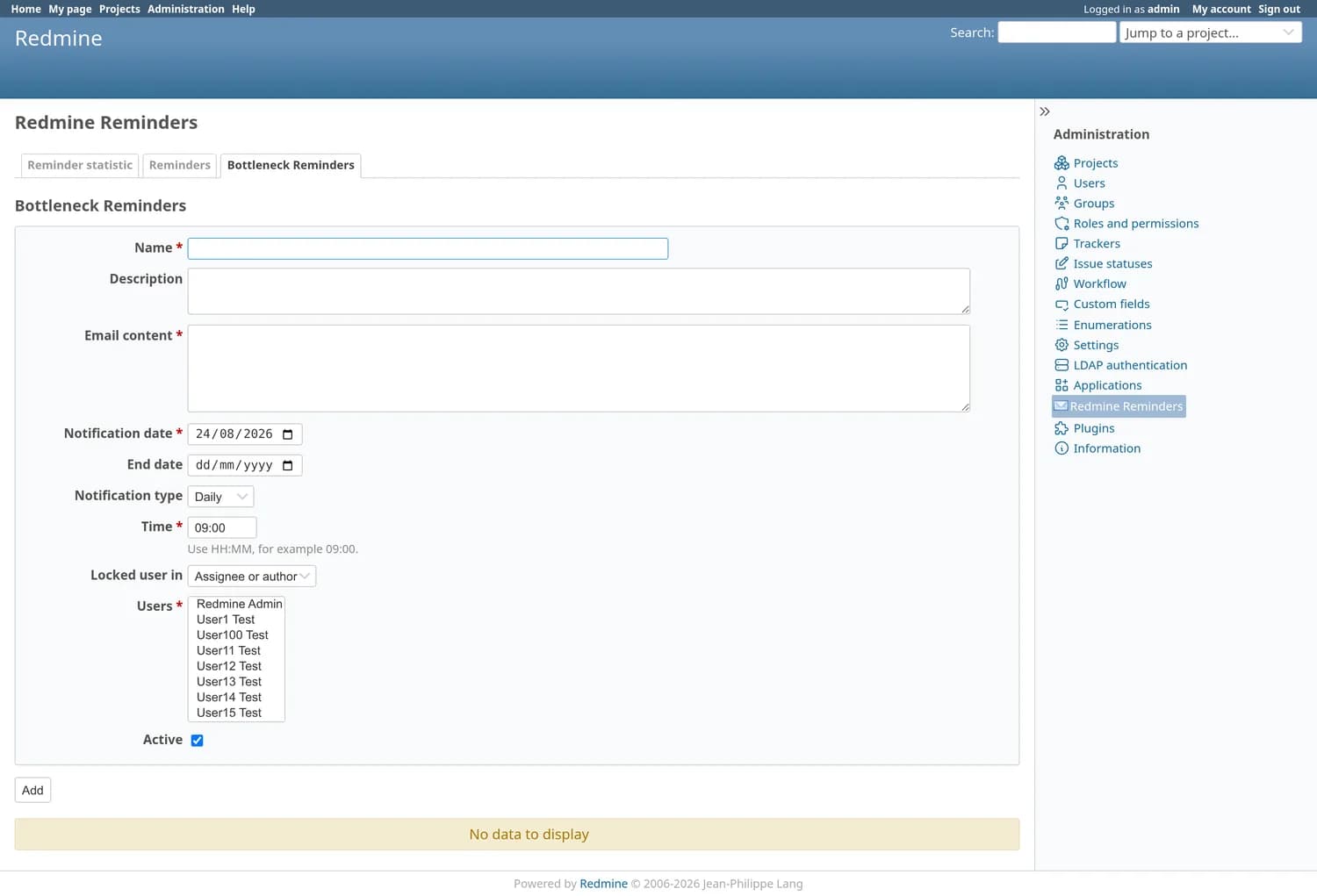
Administration › Redmine Reminders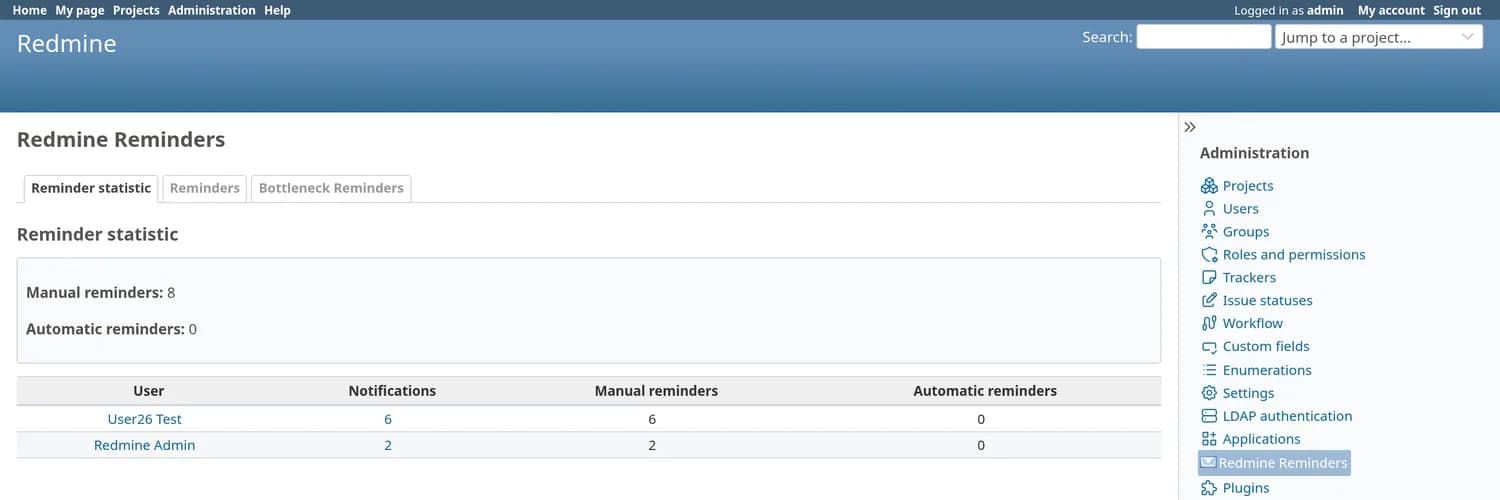
Built for the queues you already keep
Reminders read your saved queries, respect your permissions, and write everything they do into their own activity stream.
| Aspect | Capability | How it behaves |
|---|---|---|
| Who | Assignee, author, watchers, or a picked list | Each rule chooses its receivers. Inactive users and users without a mail address are dropped before anything is sent. |
| When | Daily, weekly or monthly at HH:MM | Weekly rules pick weekdays, monthly rules pick dates, and a start and end date bound the whole run. |
| Digest | Send only the count | Point one rule at several queries and mail the numbers instead of the issues — a standing pulse check for leads. |
| Guard | Closed issues never get nagged | Closed issues, disabled project modules and locked accounts are filtered at delivery time, not at scheduling time. |
| Proof | A full activity log | Created, sent, skipped, rule run started, rule run finished — each with the exact subject and body that went out. |
| Access | Four permissions, per project | View, manage, send and view statistics — granted by role, on top of a project module you can switch off entirely. |
A cron tick in, an email out
Four steps, all inside your Redmine. Nothing leaves the server except the mail your instance already sends.
| Step | What happens |
|---|---|
| 1. Cron ticks | A one-line crontab entry runs rake redmine_reminders:queue, which enqueues a background job. With no worker running, the synchronous :run task does the same work in place. |
| 2. Rules check themselves | Each active rule asks whether it is due: inside its date window, matching today's weekday or date, past its scheduled time, and not already run today. |
| 3. Receivers resolve | The query runs, closed issues fall away, and receivers are expanded to real, active, mailable users. Duplicates collapse, so nobody gets the same nudge twice. |
| 4. Mail, then log | Delivery goes through Redmine's own mailer, so it inherits your SMTP settings and issue mail headers. Every send — and every skip — is written to the reminder activity stream with its subject and body. |
What lands in the inbox
A subject that carries the project and the issue — [Support — #4821] Redmine Reminder: SSO login fails on Safari — over a body that links straight back to the issue and quotes the note whoever set the reminder wrote. It is your instance's mailer, your SMTP configuration and your sender address; the plugin adds no delivery path of its own.
Nobody gets nagged twice
A reminder plugin earns its place by what it declines to send. Four checks sit between a due rule and an inbox.
Filtered at delivery, not at scheduling
Closed issues, projects whose module has been switched off and locked accounts are re-checked the moment the mail is about to go out — so a ticket resolved an hour ago is already out of the batch.
Only real, mailable users
Receivers are expanded to actual accounts, then inactive users and users without a mail address are dropped. A group of watchers where half have left the company mails the half that has not.
At most once a day, per rule
A rule that has already run today will not run again, whatever the cron does. Within a run, duplicate receivers collapse, so one person on three of the matched issues still gets one message.
Skips are recorded too
A scheduled reminder for an issue that closed first is written to the log as skipped, with its reason. The activity stream answers “why did nobody get chased?” as readily as “who was chased?”.
Broadcasts, bottlenecks, and proof
The administration console adds the three things that only make sense across every project at once.
Broadcast to everyone who needs it
Compose a subject and body, choose the recipients and a date window, and the same scheduler that runs the rules delivers it — no separate mailing tool, and the same activity log afterwards.
Find the bottleneck accounts
One rule watches every open issue assigned to, or created by, a locked account and mails the list to whoever should reassign the work. Departures stop being a silent backlog.
Statistics that name names
Manual versus automatic counts per person, over the period you choose, with a drill-down into the exact subject and body each user received. Useful when someone says they were never told.
| Permission | What it allows |
|---|---|
| View reminders | See the reminders and rules attached to a project's issues |
| Manage reminders | Create, edit, pause and delete the rules on a project's saved queries |
| Send reminders | Use the manual button on an issue and schedule one for a later date |
| View statistics | Open the counts per person and the activity log behind them |
Install in three steps
Requires shell access and the ability to run rake tasks. Always back up before installing a plugin.
cd /path/to/redmine
# the package arrives by email, or from your download link
unzip redmine_reminders-1.0.0.zip -d plugins/
bundle install
RAILS_ENV=production bundle exec rake redmine:plugins:migrate NAME=redmine_reminders
touch tmp/restart.txt   # or systemctl restart redmine
# every minute: enqueue due rules and scheduled reminders
* * * * * cd /path/to/redmine && RAILS_ENV=production \
  bundle exec rake redmine_reminders:queue >> log/redmine_reminders_cron.log 2>&1

# no ActiveJob worker? use the synchronous task instead
# bundle exec rake redmine_reminders:run
Do we need a background worker for it?
What happens if an issue is closed before its scheduled reminder fires?
Who actually receives a reminder?
Can one rule cover several queries and just send the numbers?
Does anything go through an external service?
How does it avoid mail storms?
Who is allowed to create rules?
Which Redmine versions does it support, and what does it add to the database?
Pricing
Single server
One Redmine instance · unlimited users · 12 months of updates.
Multiple servers
Unlimited Redmine servers · unlimited users · 12 months of updates.