
Redmine SLA
SupportA four-hour SLA is not four hours. Response and resolution measured in working time — your calendars, your holidays, your pause rules — with warning, critical and breach detection.
Multiple servers: $399
- Redmine
- 4, 5, 6 and 7
- Targets
- 4 independent clocks
- Databases
- PostgreSQL, MySQL, MariaDB, SQLite
- Reports
- 4, with CSV export
- Extra gems
- None
- Core files changed
- None
Working hours, properly
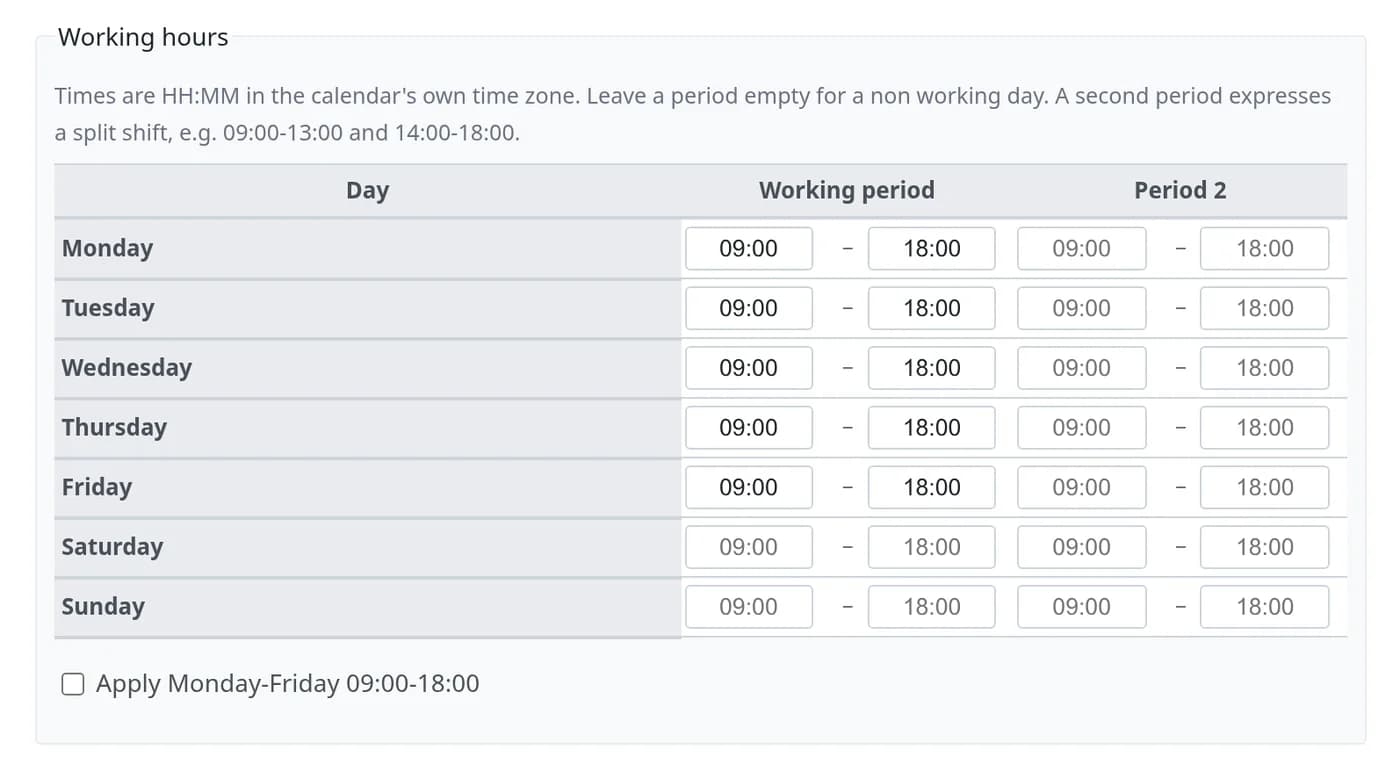
Weekly schedules with split shifts, per-calendar time zones, fixed and recurring holidays and special working days. Wall-clock across DST, so 09:00–18:00 stays 09:00–18:00.
Four independent clocks
First response, acknowledgement, resolution and closure — each with its own target, state and pause behaviour. Configure only the ones you use.
Waiting on the customer
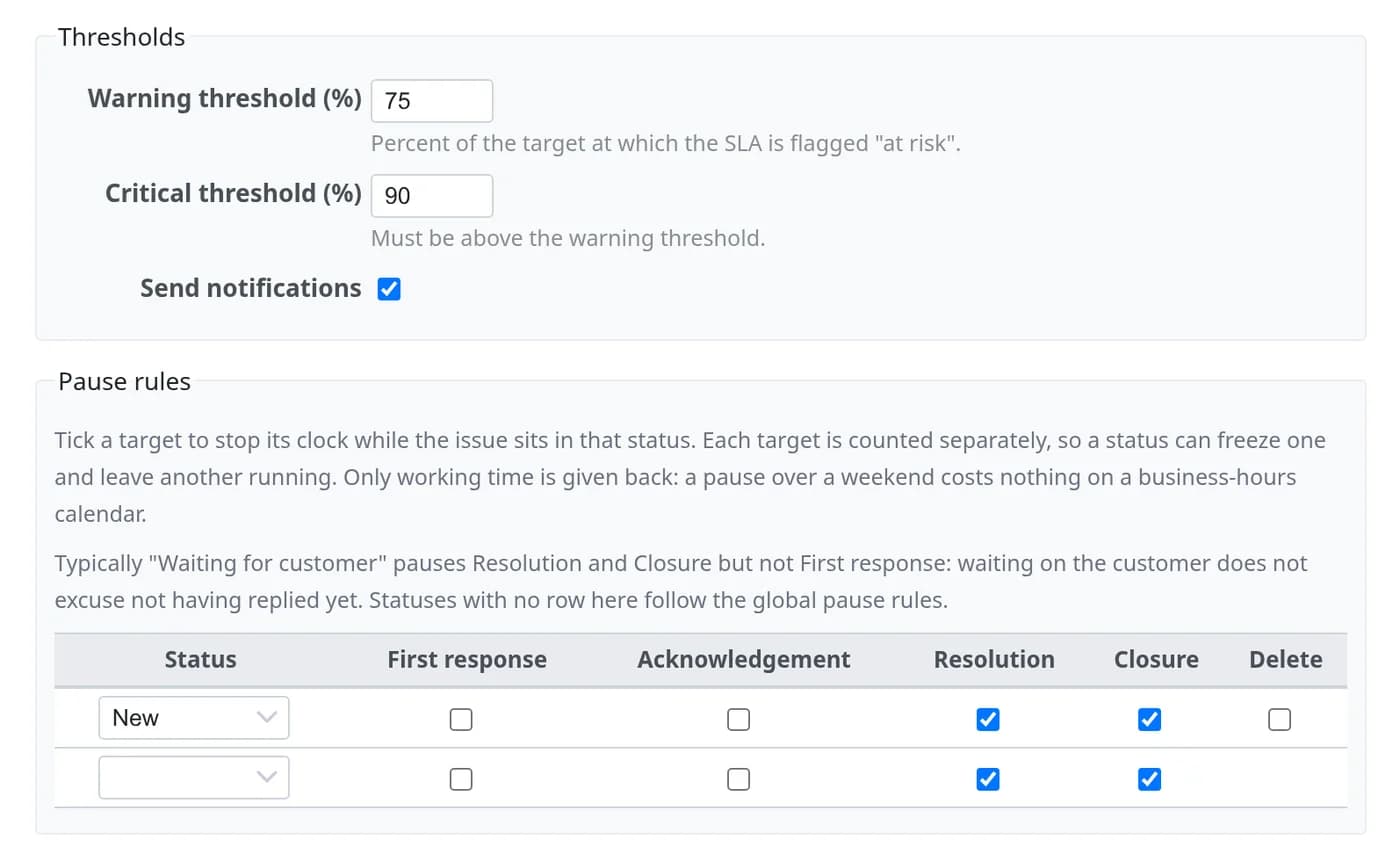
Per-status rules decide which clocks stop. “Waiting for customer” can freeze resolution while first response keeps running — because that one is still on you.
Conditions in plain words
Match on project, tracker, status, category, assignee, group, customer or any custom field — by real names, never record IDs.
Warning, critical, breach
Thresholds fire before the deadline, not after it. Mail goes through Redmine’s own mailer, and a unique-index claim means no alert is ever sent twice.
Compliance you can defend
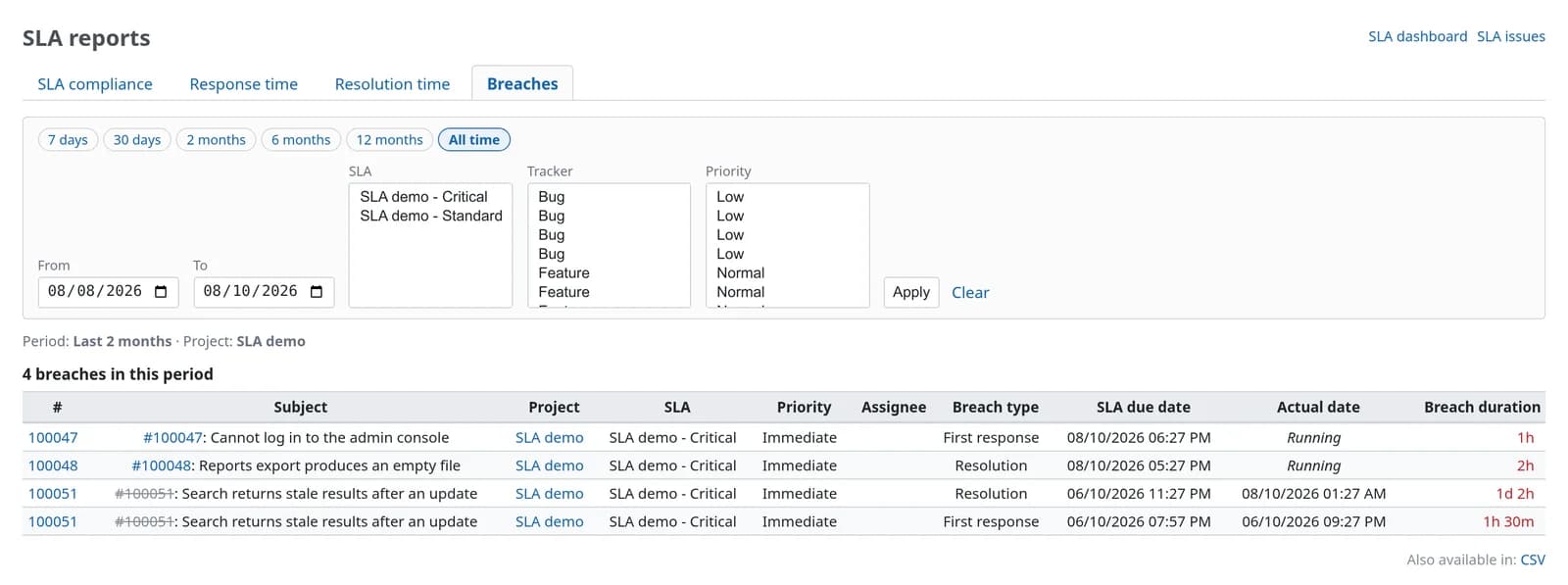
Compliance by target, response and resolution distributions with median and outliers, and a breach table with due date, actual date and overrun.
Your clock stops when your team goes home
Subtracting two timestamps punishes you for weekends. Redmine SLA walks your business calendar and counts only the minutes you are open, so a four-hour target raised late on Friday is due on Monday, not the same night.
| Issue raised | Working time counted | Due | Wall clock |
|---|---|---|---|
| Tuesday 09:30 | 4h, uninterrupted | Tuesday 13:30 | 4 hours |
| Friday 17:00 | 1h on Friday, 3h on Monday | Monday 12:00 | 67 hours |
| Friday 17:00, Monday a holiday | 1h on Friday, 3h on Tuesday | Tuesday 12:00 | 91 hours |
| Any time, on a 24×7 calendar | 4h elapsed | Four hours later | 4 hours |
Calendars support split shifts, their own time zone, one-off and recurring holidays, and special working days.
Four clocks, each with its own rules
Set only the targets you actually promise. Each one starts, pauses and stops on its own event, so “waiting for customer” can freeze resolution while first response keeps running.
First response: someone answered
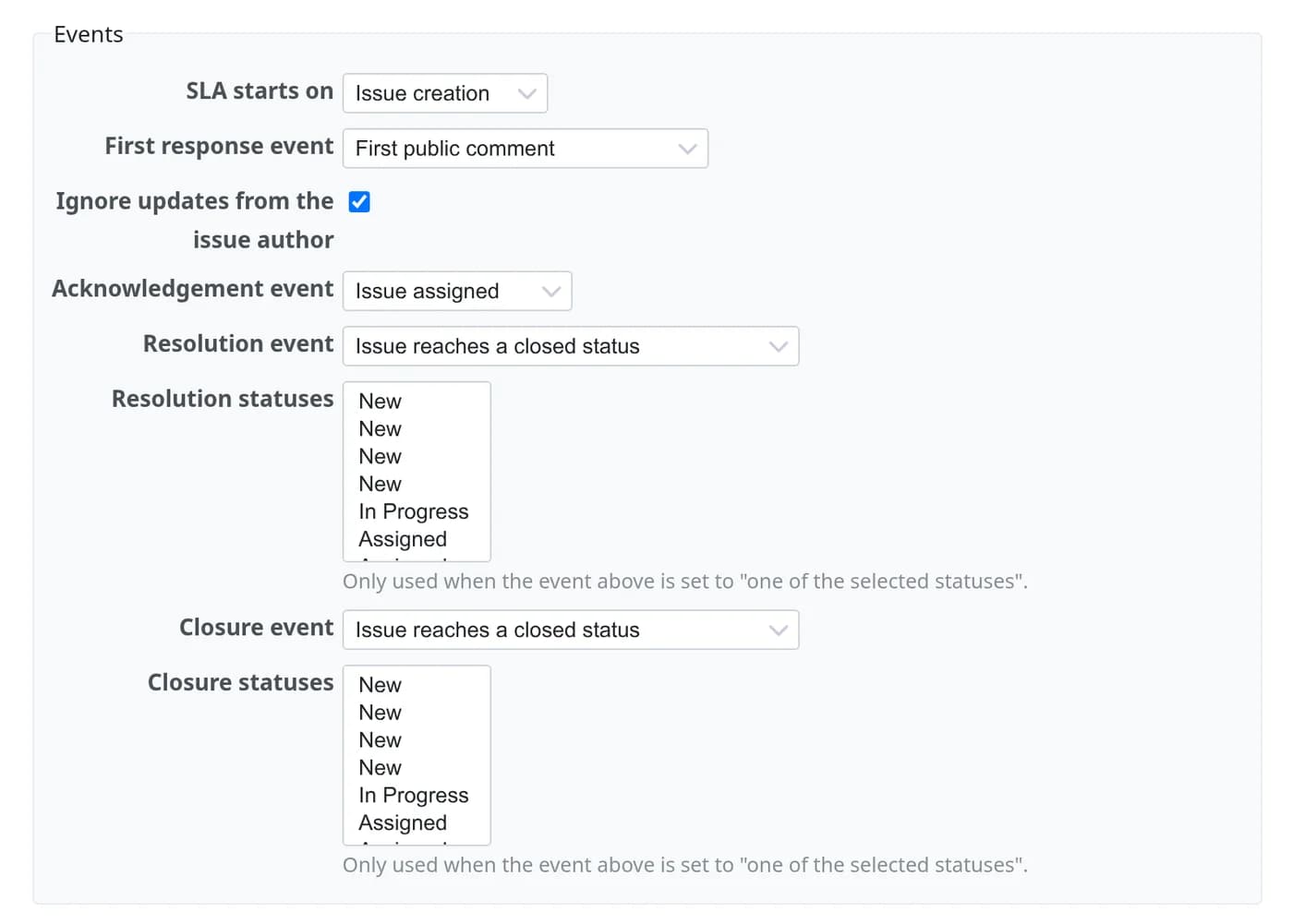
Stops on the first public comment from anyone other than the author. What counts as a reply is set per policy.
Acknowledgement: someone owns it
Stops when the issue is assigned, or when it reaches a status you choose.
Resolution: the problem is fixed
Stops when the issue reaches a closed status, or one of the resolution statuses you pick.
Closure: the ticket is done
A separate target for the final close, for teams that resolve first and confirm with the customer later.
It looks like Redmine, because it is
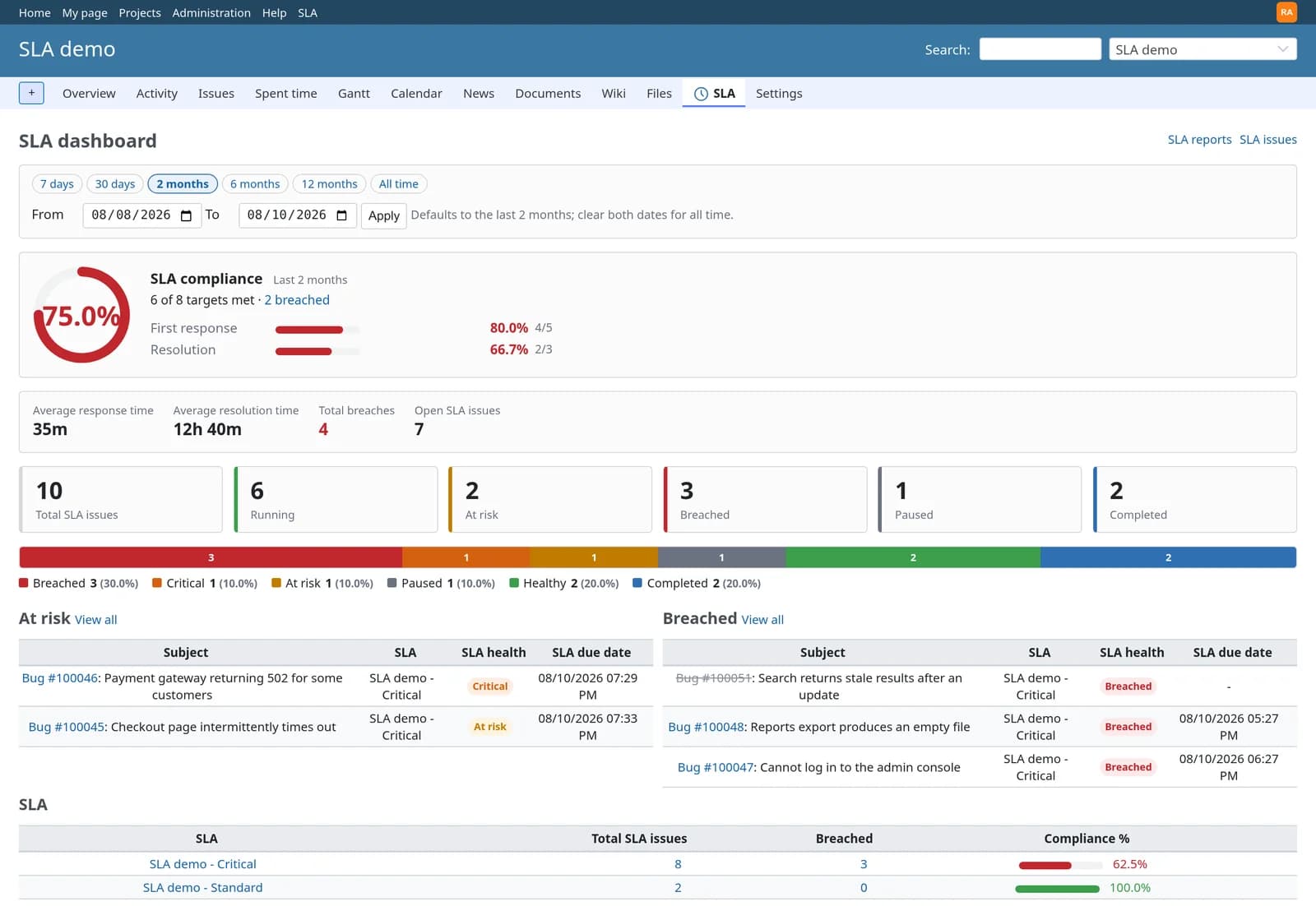
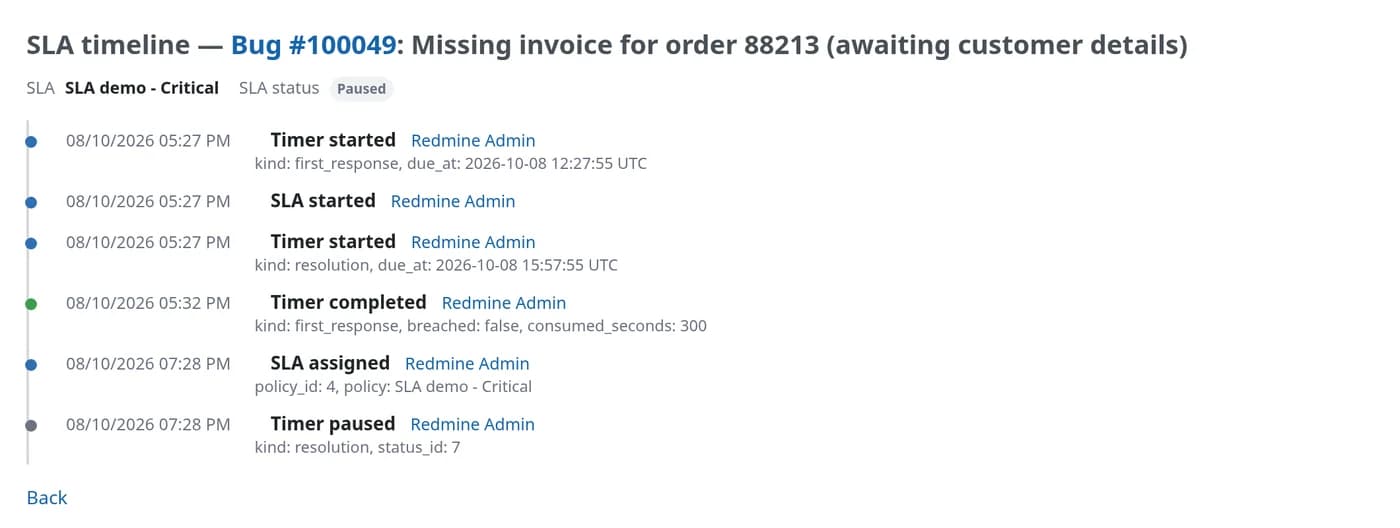
No iframe, no separate app, no second login. These are real screens from the plugin on Redmine 7.0, showing a demo project with issues in every SLA state.
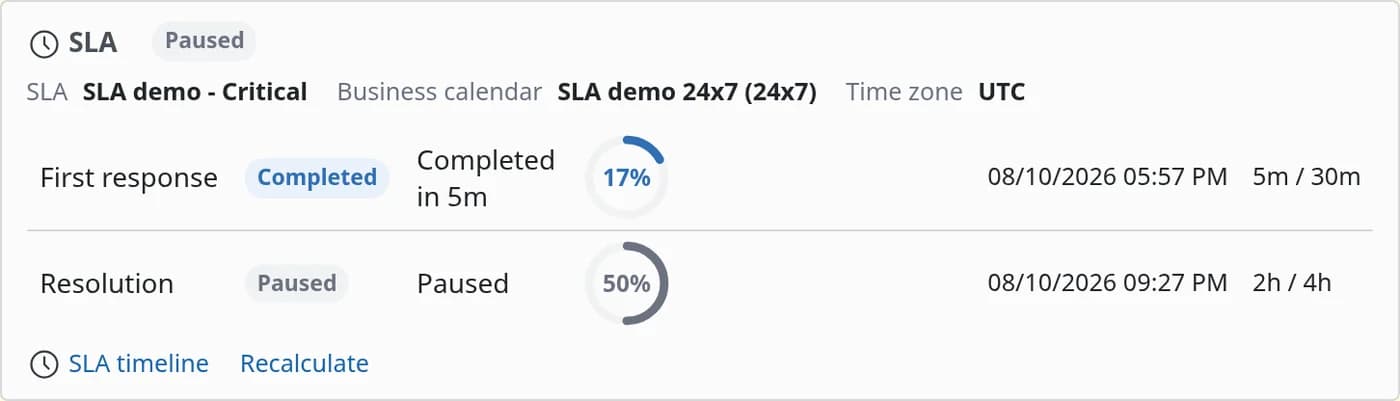
Agents: the SLA panel on every issue
One row per target, with its state, the time left, how much of the target is used and the exact due date.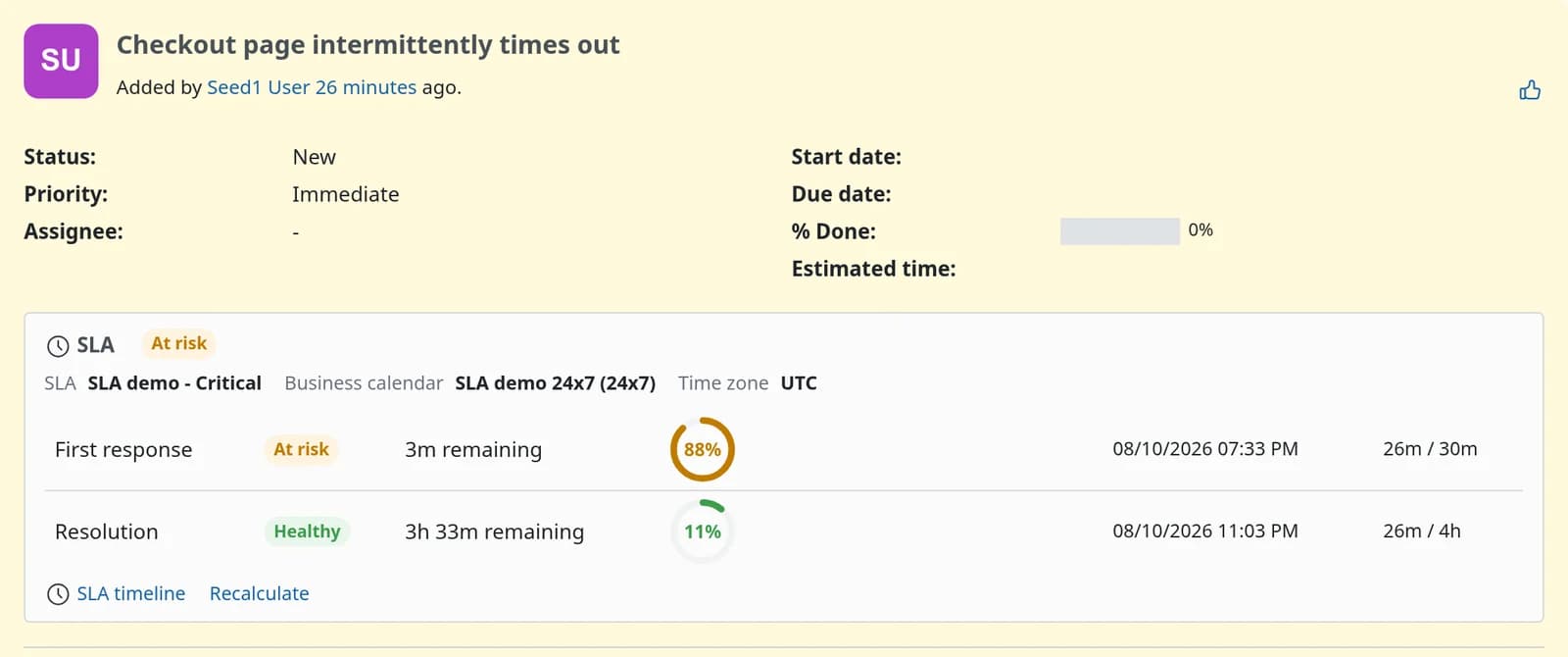
Team leads: the queue, sorted by what is about to go wrong
Filter by status, health, policy or breached, sort by due date, export to CSV. The same fields are filters and columns in Redmine’s own issue list.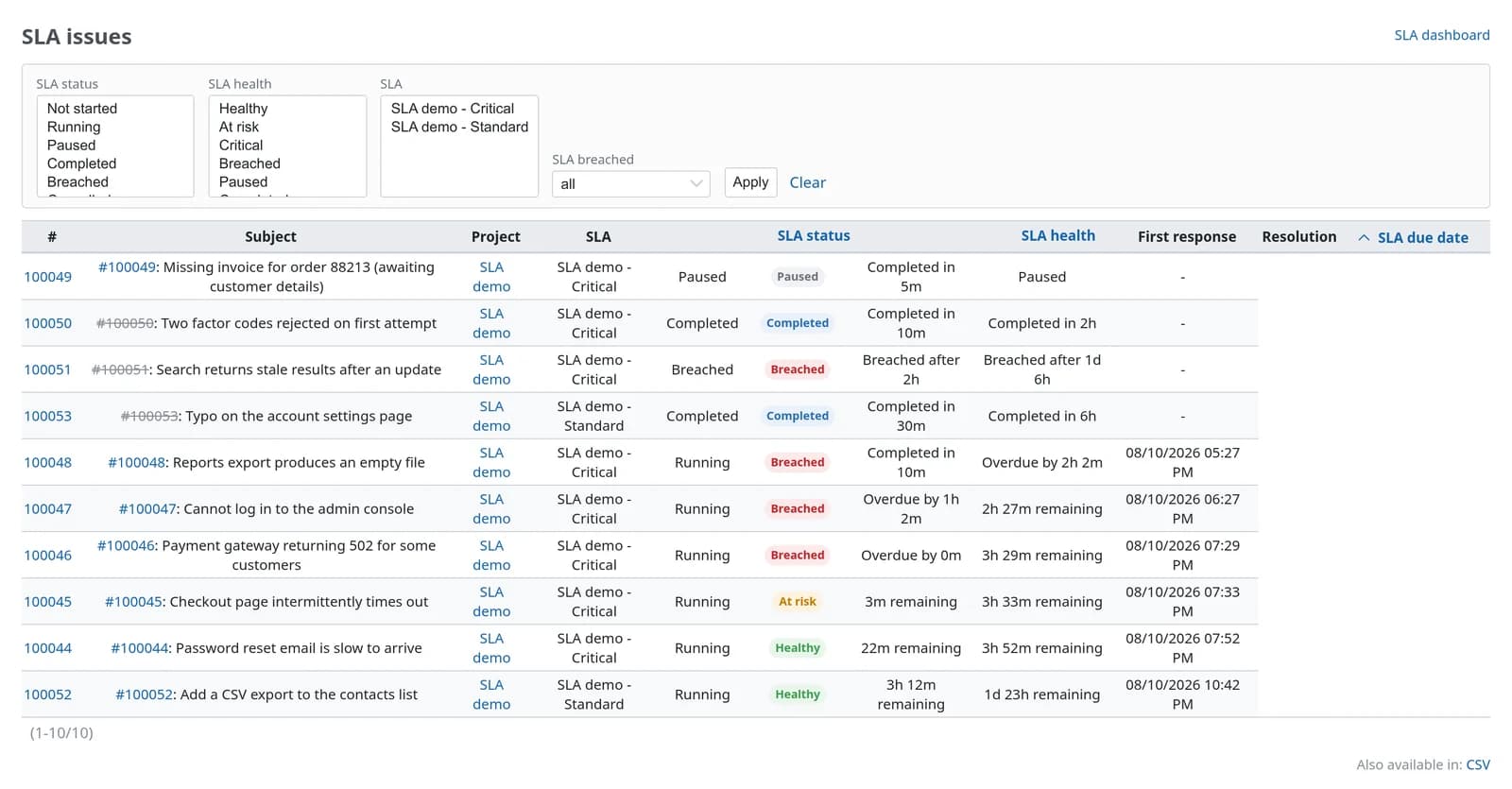
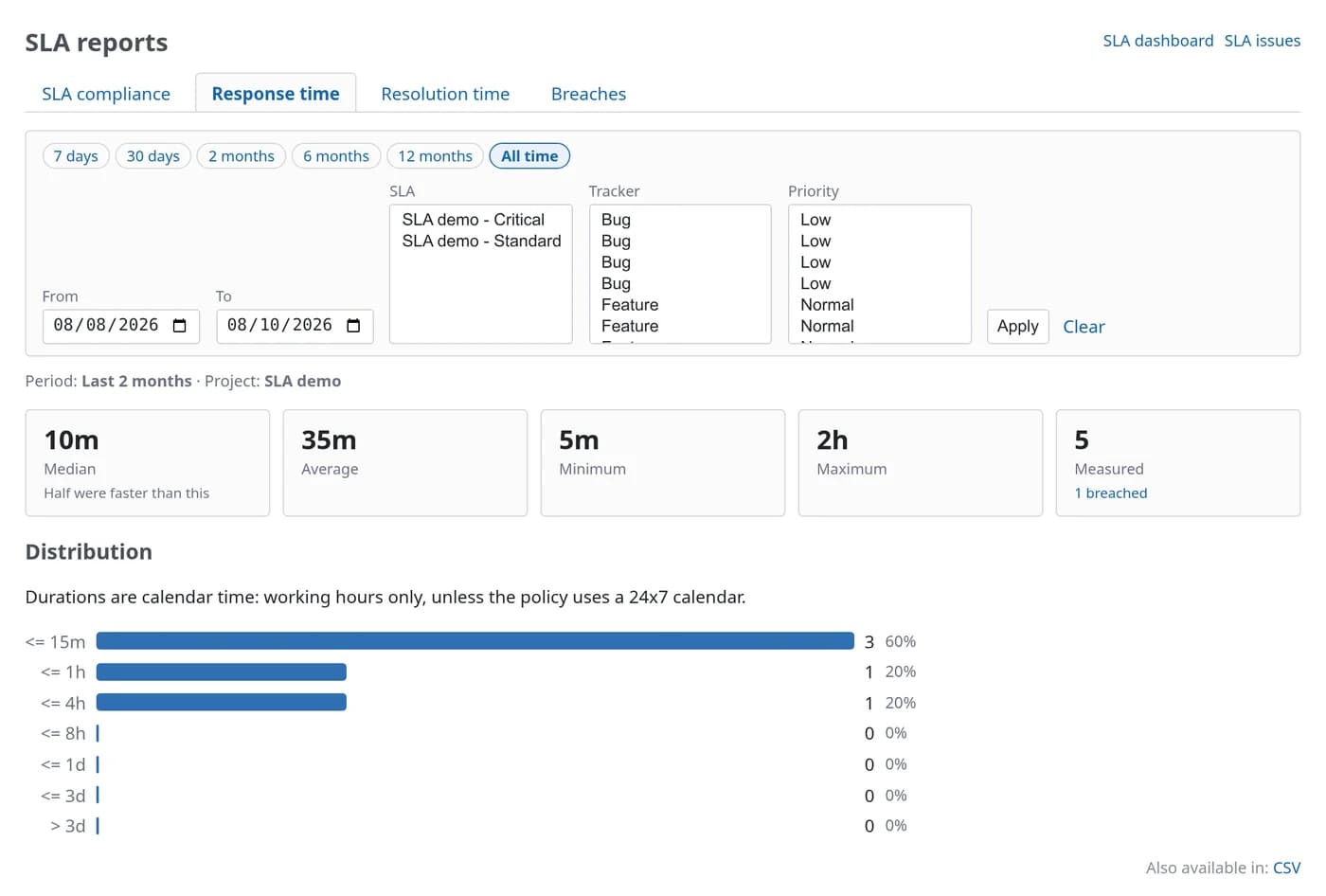
Managers: reports you can put in front of a customer
Compliance, response time, resolution time and breaches, filtered by period, policy, tracker and priority. Every report exports to CSV.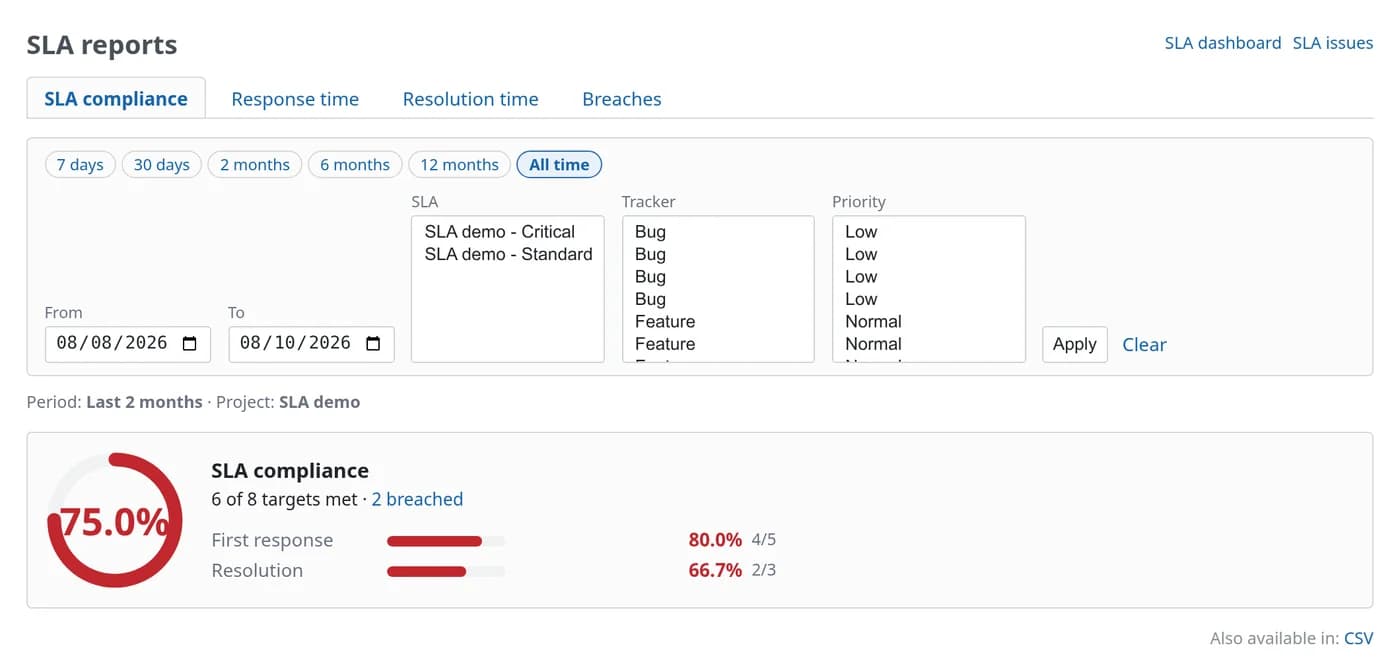
Admins: policies written in plain words
“When the issue’s Priority is one of Urgent, Immediate.” Conditions use real names from pickers, not record IDs. Durations accept 30, 4h or 1d 4h.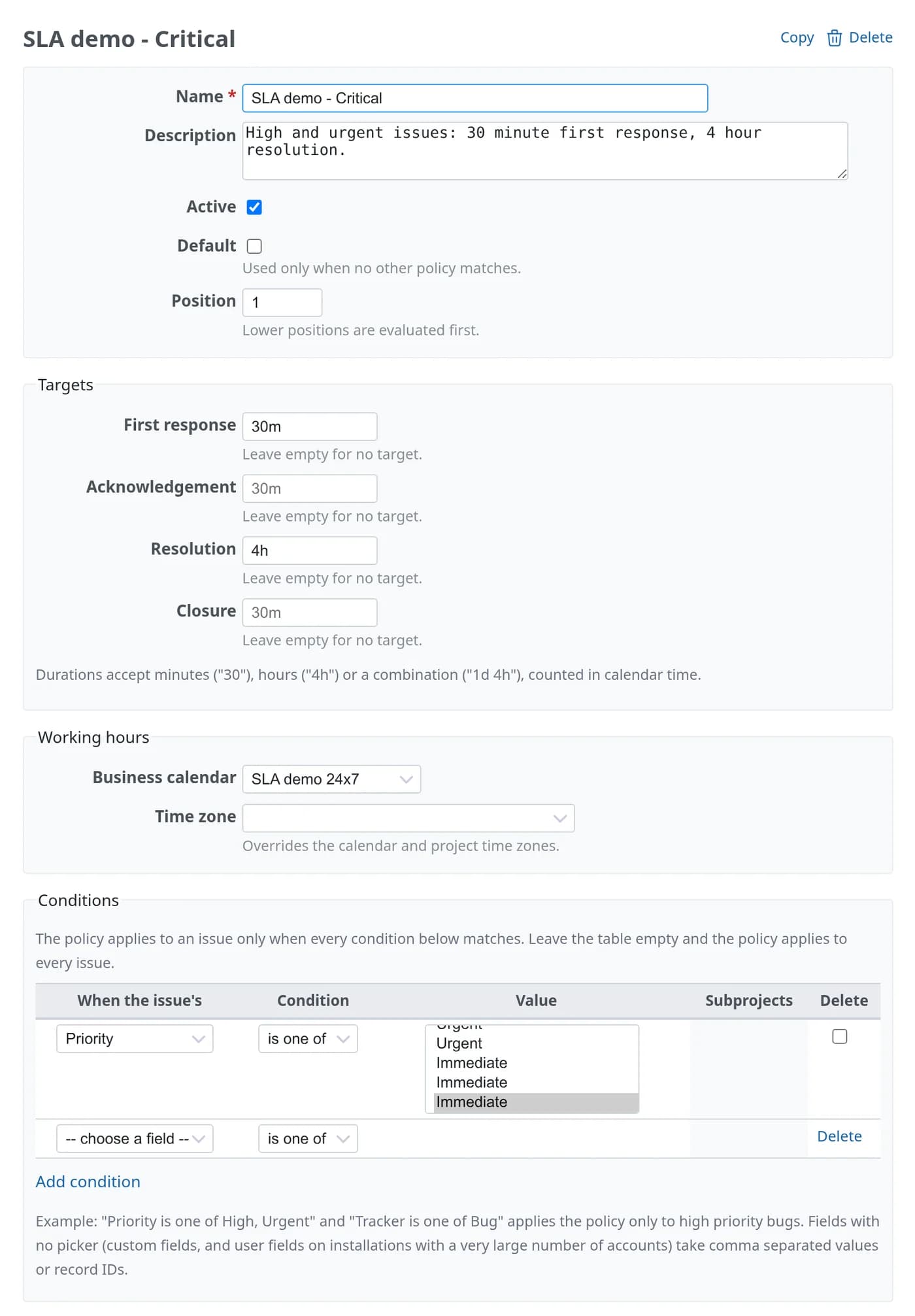
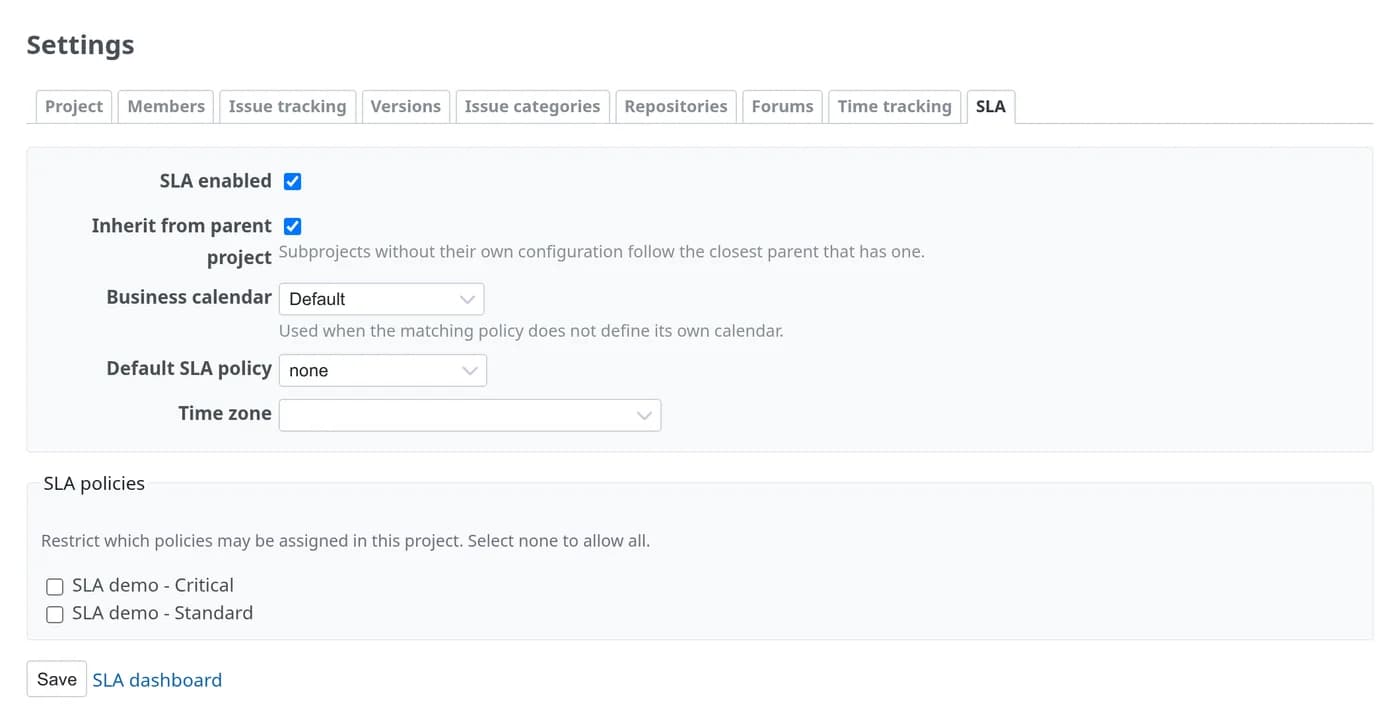
Operations: one place to see that it is all working
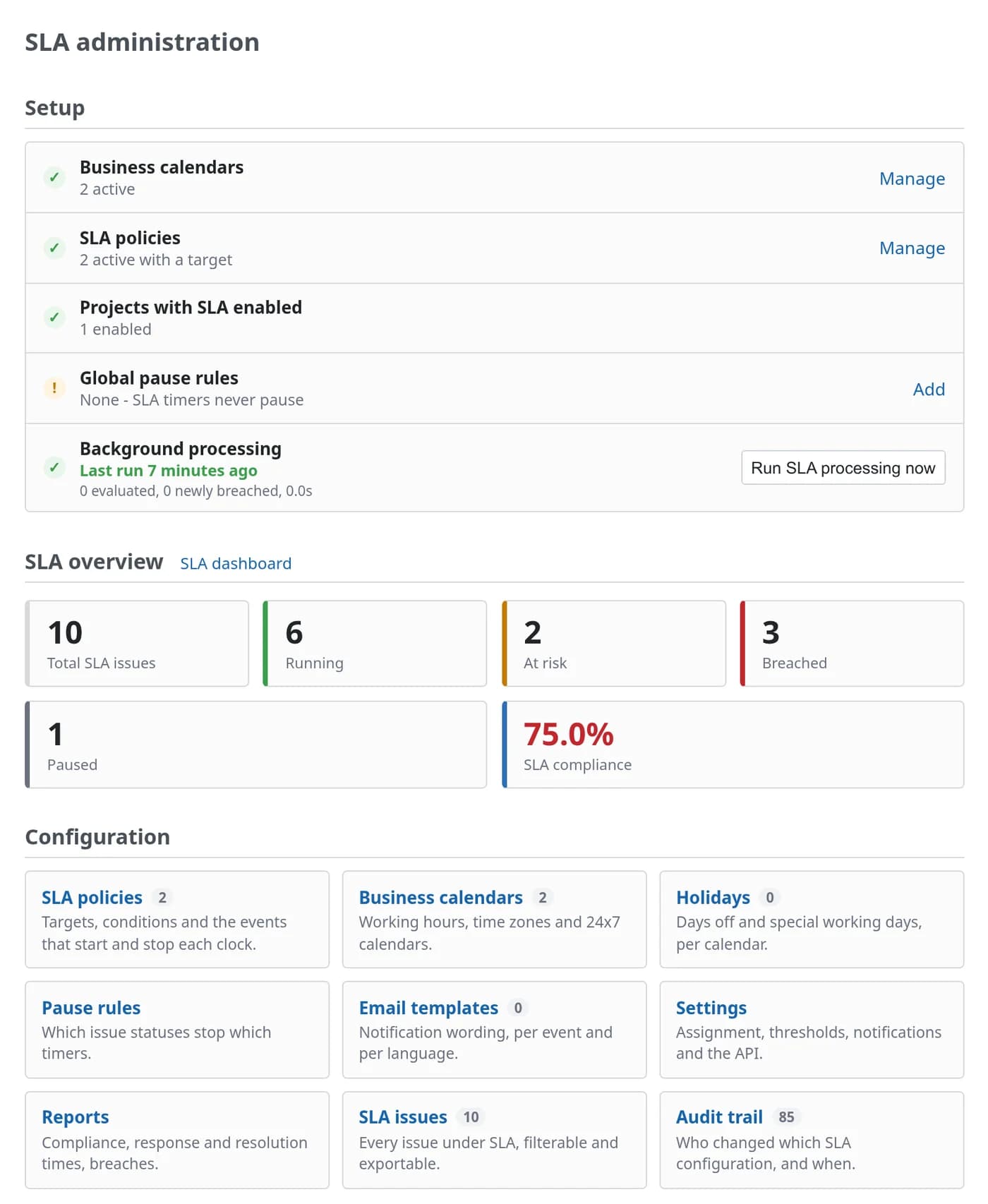
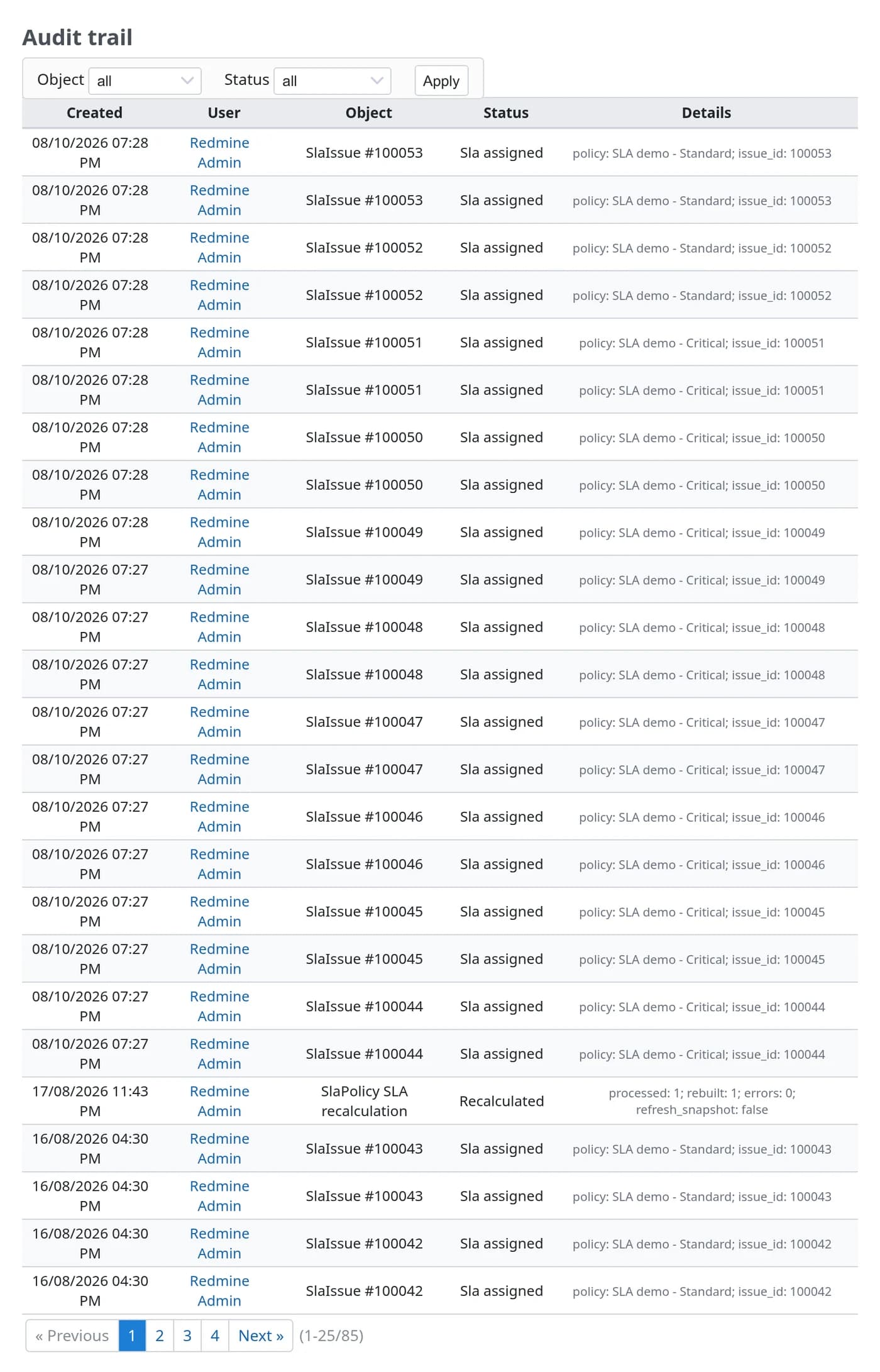
Everything a service desk actually argues about
Disputes are rarely about whether a ticket was late. They are about which hours counted, when the clock should have stopped, and what the target was at the time.
Working hours, done properly
Weekly schedules with split shifts, per-calendar time zones, fixed and recurring holidays and special working days. 09:00 stays 09:00 across daylight saving changes.
Waiting on the customer
Pause rules per status, globally or per policy. Only working time is given back, so a pause over the weekend costs nothing.
Warning, critical, breach
Thresholds fire before the deadline. Each notification is sent once through Redmine’s own mailer, with templates you can edit per event and language.
The right policy for each issue
Match on project and subprojects, tracker, priority, status, category, author, assignee, group or any custom field. Lower positions win when several policies match.
Inside the issue list
SLA policy, status, health, breached, due date and time remaining as filters and columns in Redmine’s issue list: sortable, groupable and exportable.
Edits do not rewrite history
Every SLA keeps a snapshot of the policy it started with. Changing a target next quarter leaves last quarter’s numbers alone. Recalculating is a deliberate admin action.
What happens to one issue
A critical bug raised on a Friday afternoon, on a Monday to Friday 09:00 to 18:00 calendar, with a 30-minute first response target and a four-hour resolution target.
| When | Event | What the plugin does |
|---|---|---|
| Fri 15:00 | Raised | The first matching policy attaches and its clocks start. Three working hours are left today, so one carries over to Monday. |
| Fri 15:20 | First reply | A public comment from an agent stops the first response clock at 20 minutes, inside its 30-minute target. |
| Fri 16:00 | Waiting | Resolution pauses. When the customer answers on Monday, the due date moves forward by exactly the working time lost. |
| Monday | Warning at 75% | The warning email goes out while there is still time to act on it. |
| Monday | Resolved | The time consumed and whether the target was met are recorded, and never change again. |
| Consumed | Health |
|---|---|
| Below 75% | Healthy |
| 75% | At risk |
| 90% | Critical |
| 100% | Breached |
| On hold | Paused |
| Target met | Completed |
JSON for every screen
A read-only JSON API covers everything the screens show. It authenticates with a normal Redmine API key and follows the same permissions as the pages.
| Method | Endpoint | Returns |
|---|---|---|
| GET | /sla/issues/:id.json | The SLA of one issue |
| GET | /sla/issues.json | SLA issues, filterable |
| GET | /projects/:id/sla/issues.json | SLA issues of one project |
| GET | /sla/timeline/:id.json | Timeline of one issue |
| GET | /sla/dashboard.json | Dashboard counters and compliance |
| GET | /sla/reports/:report.json | Any of the four reports |
| GET | /sla/policies.json | Policies and their targets |
| GET | /sla/calendars.json | Calendars and working hours |
Read one issue’s SLA
Send your key in the X-Redmine-API-Key header. The response carries the policy, calendar, overall health, and one entry per target with its state, due date and time consumed. Use it to put SLA countdowns on a wallboard, or to feed compliance figures into your own reporting.
Six permissions, granted per role
SLA is a standard Redmine project module. Enable it on the projects you measure and give each role only what it needs. Redmine administrators always have the two global permissions.
| Permission | Scope | What it allows |
|---|---|---|
| view_sla | Project | See the SLA panel on issues, the SLA issue list and the timeline |
| view_sla_dashboard | Project | See the SLA dashboard |
| view_sla_reports | Project | See and export the SLA reports |
| manage_sla | Project | Edit the project’s SLA settings and recalculate an issue’s SLA |
| manage_sla_policies | Global | Create and edit policies and pause rules |
| manage_sla_calendars | Global | Create and edit calendars and holidays |
Runs where your Redmine already runs
| Environment | Status | Notes |
|---|---|---|
| Redmine 7.x | Supported | Tested on Redmine 7.0 with Rails 8.1 and Ruby 3.4.2. The screenshots on this page are from 7.0. |
| Redmine 6.x | Supported | |
| Redmine 5.x | Supported | Needs the plugin assets task after migrating |
| Redmine 4.x | Supported | 4.0 is the minimum version the plugin declares |
| Databases | Supported | PostgreSQL, MySQL, MariaDB and SQLite, with no database-specific SQL |
| Extra gems | None | No Redis, no Sidekiq. One cron entry or systemd timer runs the background check. |
| Redmine core | Untouched | No core file is edited, so Redmine upgrades are unaffected |
Install in three steps
Requires shell access and the ability to run rake tasks. Always back up before installing a plugin.
cd /path/to/redmine
# the package arrives by email, or from your download link
unzip redmine_sla-1.0.0.zip -d plugins/
RAILS_ENV=production bundle exec rake redmine:plugins:migrate
# Redmine 4 and 5 only (Redmine 6+ serves plugin assets directly)
RAILS_ENV=production bundle exec rake redmine:plugins:assets
touch tmp/restart.txt   # or systemctl restart redmine
# every five minutes: evaluate timers that are due, safe to run repeatedly
*/5 * * * * cd /path/to/redmine && RAILS_ENV=production bundle exec rake redmine_sla:process >> log/sla.log 2>&1
# Administration → SLA → create the default business calendars, then follow the checklist
# Administration → SLA → Policies → write one policy: targets, calendar, conditions
# Project → Settings → Modules → tick SLA for each project you measure
# Administration → Roles and permissions → grant the SLA permissions
Does the plugin modify Redmine core files?
What happens to existing SLAs when I edit a policy?
Does it need Redis, Sidekiq or extra gems?
Can different customers or projects have different SLAs?
What about issues that existed before I installed it?
Is uninstalling safe?
Are the screenshots real?
Pricing
Single server
One Redmine instance · unlimited users · 12 months of updates.
Multiple servers
Unlimited Redmine servers · unlimited users · 12 months of updates.